

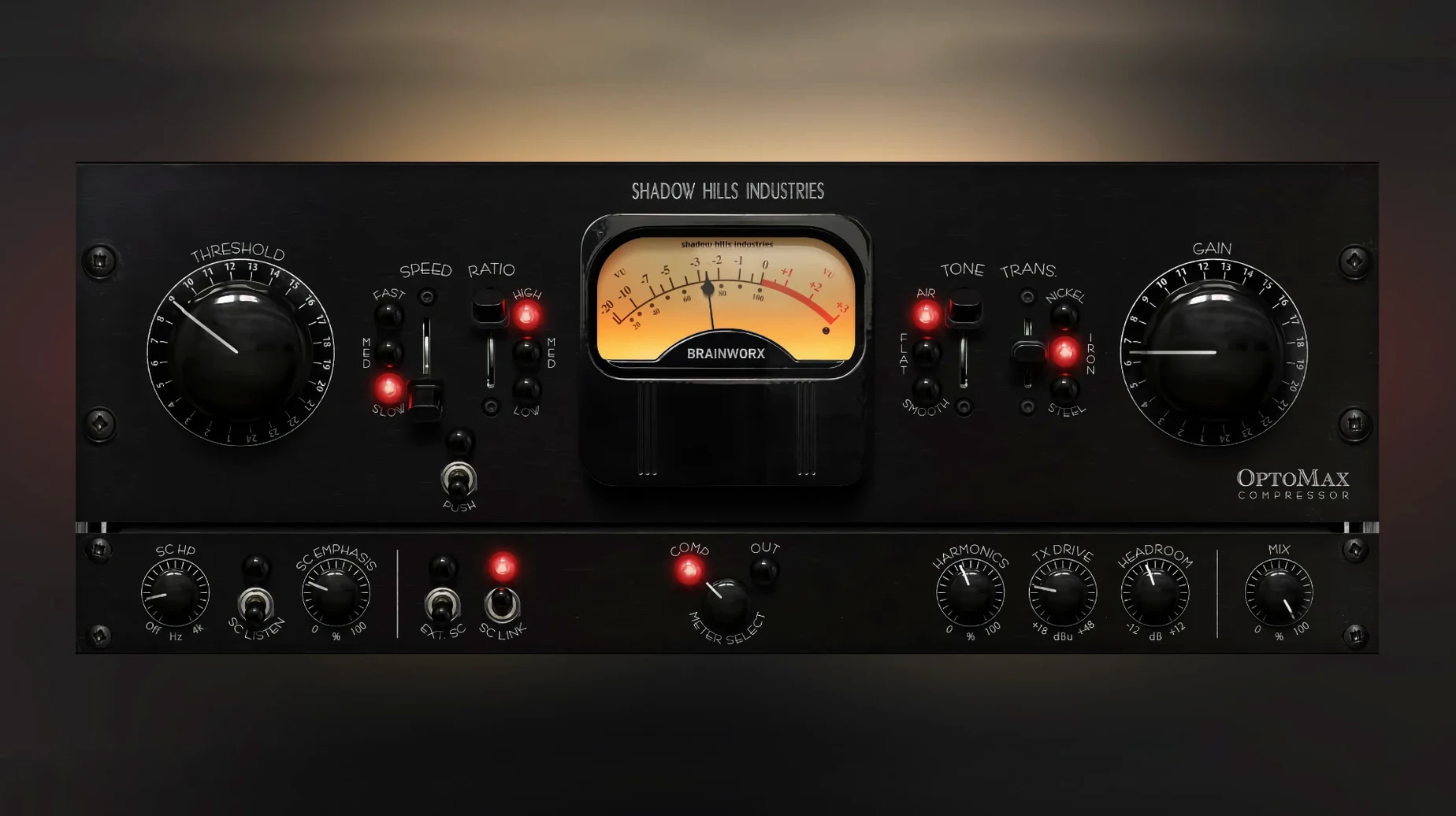
Three transformers sit under the hood—nickel, iron, and steel. That’s the first thing you notice when you pull up the Shadow Hills OptoMax. This isn’t a one-trick optical comp; it’s a plugin that gives you distinct color choices before you even touch the threshold. Nickel keeps things open and airy, iron brings a familiar midrange push, and steel can get heavy when the track calls for it.
The optical circuit itself behaves the way you’d hope—slow on the uptake, smooth on the release, and never grabbing in a way that feels electronic. What sets it apart is the Softness control, a high-frequency mode that lets the top end breathe while the compressor clamps down on the body of the signal. For a vocal that’s getting poky or a synth pad that’s fighting the cymbals, you can ease that harshness without darkening the whole track.
Sidechain filtering here goes beyond a simple low-cut. You can shape what the detector hears with real precision, so the kick drum doesn’t have to dictate the whole mix bus movement. Toss in a parallel mix knob, and you can fold the dry signal back in for transient retention that optical circuits sometimes round off. It works on a drum group just as well as it does across the master fader.
If you spend time massaging mix glue or want an optical flavor with more than a needle and a gain knob, this one deserves a slot in your folder.
A common snag with optical compressors is mistaking gentle action for doing nothing. With OptoMax, the first few dB of gain reduction can feel invisible—especially on the nickel transformer setting, which doesn't thicken the signal the way iron does. If you're squinting at the meter and not hearing the change, try this: set the mix control fully wet, pull the threshold down until you see 5–7 dB of reduction on peaks, then back it off until the needle barely twitches. That shallow zone is where the optical circuit rounds off transients without flattening the performance. The Softness control can also trick the ear; cutting high-frequency content in the detector path makes the compression less audible up top, so what sounds like "nothing happening" is often the top end staying open while the midrange gets tucked in.
Another snag shows up when you stack OptoMax on a bus that already has aggressive EQ moves. The sidechain filter defaults to a broad detection curve, and if your low end is heavily boosted, the compressor will clamp down harder than you intend. The fix isn't subtlety—it's dialing the sidechain high-pass up to 120 Hz or higher and switching the filter slope to the steeper option. On a bass-heavy mix where the kick and 808 are walking all over the needle, that one move can restore a couple dB of headroom without touching the threshold. Steel transformer users sometimes report a "closed-in" sound after a few minutes of listening; that's usually ear fatigue from the added low-mid weight, not a flaw in the plugin. Switching to nickel for a reference pass or lowering the mix to 60% wet often clears it up.
A drum bus glue workflow, start to finish
Let's say you've got a drum group—kick, snare, overheads, some room mics—and the transients are poking through the mix in a way that fader moves alone can't tame. Start with the iron transformer engaged; it adds just enough midrange push to help the snare body sit without extra EQ. Set the response switch to medium. Fast tends to choke room ambience on drums, and slow lets too much initial crack through for this task.
Pull the threshold down until the snare hits trigger about 4 dB of reduction. The kick will push the needle deeper, maybe 6–7 dB, and that's fine—the optical release will recover before the next backbeat. Now engage the sidechain filter at 90 Hz with a gentle slope. This keeps the kick's sub frequencies from dominating the detector, so the compressor responds more to the snare and the body of the toms. Dial the Shine control up just a touch, maybe 10 o'clock; on drums, Shine opens the stick attack without making the cymbals brittle.
Finally, set the parallel mix to around 70% wet. Listen to the overheads: if the room sound is collapsing too much, pull the mix back to 50% and let the dry transients carry some air. This isn't about crushing the drums—it's about making the group feel like it's leaning forward together. When you bypass the plugin, the kit should suddenly feel looser and wider in a way that's not flattering.
Nickel to Steel transformer swap
If you load the default preset and leave everything flat, you're hearing the nickel transformer with a medium response and no high-frequency shaping. That's a fine starting point, but two settings reward immediate experimentation. The first is the transformer type. Iron adds a weight that sits beautifully under a lead vocal; steel can push a thin acoustic guitar into territory that normally requires a saturation plugin downstream. Flick through all three on your source before you touch the threshold—each one changes what the compressor "hears" as the signal's center of gravity.
The second is the Softness control, which gets overlooked because it lives next to the more obvious Shine knob. Softness works on the detector's sensitivity to high frequencies, meaning the compressor relaxes its grip on sibilance and cymbal wash while still controlling the midrange. On a full mix where the vocal is already de-essed, enabling Softness at about 30% often removes the last bit of strain from loud passages without dulling the track. For anyone who's chased a shadow hills mastering compressor mac solution and found the full unit's optical section to be the star, OptoMax isolates that character and lets you push it further than the hardware typically allows. The sidechain filter shape deserves a mention too—switching from the default gentle slope to the steeper cut can rescue a mix where the bass guitar and kick drum are fighting for the same compressor reaction.
- macOS 12 or later
- Apple Silicon and Intel Macs
Questions I actually get
What is the Shadow Hills OptoMax based on?
It’s inspired by the optical compression section found in the original Shadow Hills Mastering Compressor hardware.
Porch talk 0
Come in or pull up a chair to leave a comment.
Nobody has pulled up a chair yet. If you used it on a real Saturday, say what the hour was.
More for the same hour
Everything in VST Plugins Plugin Alliance Brainworx Bundle
2025.06.16 VST Plugins
2.1 GB
Plugin Alliance Brainworx Bundle
2025.06.16 VST Plugins
2.1 GB
 Pulsar Audio IPA
1.0.9 VST Plugins
75 MB
Pulsar Audio IPA
1.0.9 VST Plugins
75 MB
 RC-20 Retro Color
1.5.1 VST Plugins
170 MB
RC-20 Retro Color
1.5.1 VST Plugins
170 MB
 reFX Nexus
5.5.21 VST Plugins
72 MB
reFX Nexus
5.5.21 VST Plugins
72 MB
 Revoice Pro
5.1.30 VST Plugins
39 MB
Revoice Pro
5.1.30 VST Plugins
39 MB
 RipX DAW Pro
8.0.3 VST Plugins
1.6 GB
RipX DAW Pro
8.0.3 VST Plugins
1.6 GB
 Roland Cloud Legendary Series
2025.06.29 VST Plugins
1.3 GB
Roland Cloud Legendary Series
2025.06.29 VST Plugins
1.3 GB
 Roland ZENOLOGY Pro
2.0.7 VST Plugins
1.8 GB
Roland ZENOLOGY Pro
2.0.7 VST Plugins
1.8 GB