

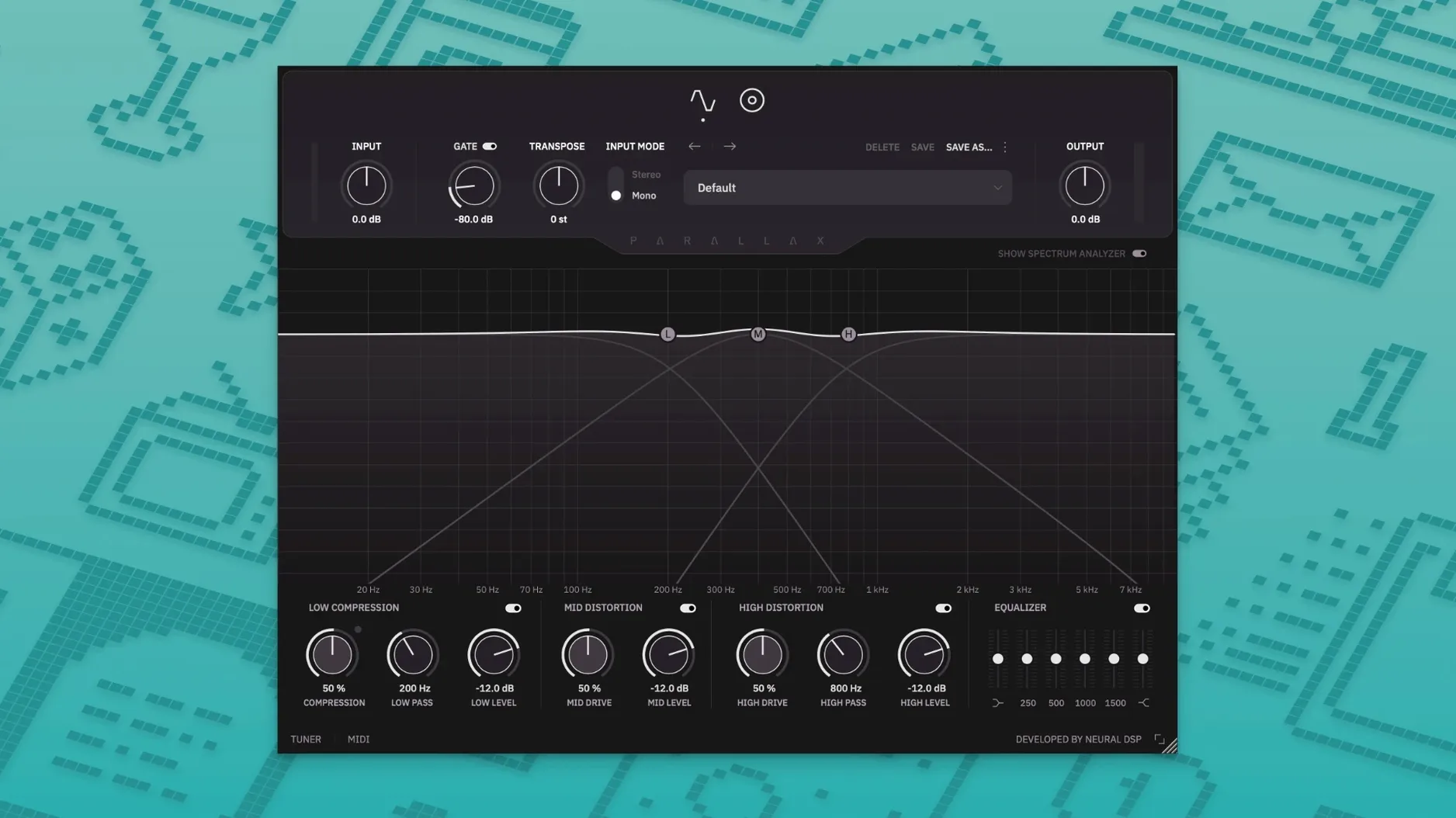
Three distinct bands, all processed in parallel and summed back together. That is the core design of Parallax X, and it sets a clear expectation before you even insert it on a track. Low frequencies get their own compressor, the midrange runs through a distortion stage tuned for note articulation, and the highs follow a tube-modeling path you can drive independently. It is a focused tool for bass that does not try to be everything.
Clanky Rock Bass That Keeps Its Sub Clean
- Getting a clanky, articulate rock bass that still holds down the low end without turning to mud.
- Adding grind to a DI bass track while keeping the sub frequencies clean and controlled.
- Shaping a bass bus where you want different textures on the attack and the body of the note.
- Standalone practice or tone crafting with the built-in tuner and metronome.
No Reverb or Delay, Just Three Parallel Bass Chains
- This is a dedicated bass processor; you will not find general-purpose reverbs or delays here.
- The parallel architecture means you are blending three processed signals, which rewards spending time on the mix of the bands.
- Installing version 1.0.0 leaves the legacy Parallax plugin untouched, so your old sessions open as they did.
Building a driven bass tone from scratch
A DI bass track lands in your DAW sounding clean but anonymous. The goal is something with weight below 100 Hz and enough midrange snarl to cut through a dense rock mix. Start by inserting Parallax X on the channel and opening the standalone window or plugin interface. First stop: the tuner in the top bar, because a slightly flat string will fight every distortion stage downstream.
Bring the low-band compressor threshold down until the needle moves with the player's dynamics — typically 4 to 6 dB of gain reduction on the heavier notes. Keep the ratio moderate, around 4:1, and set the make-up gain so the sub feels solid but never bloated. The low band now stays anchored while you rough up the mids and highs.
Flip over to the mid section. Dial the drive knob clockwise until the note attack gains a percussive edge — think pick-on-roundwound clarity rather than full-blown fuzz. Use the mid frequency slider to find where the bass sits in the song; 800 Hz often adds presence, but 1.2 kHz can push it forward in a busier arrangement. Blend this processed mid signal with the fader next to the drive control. Start at noon and sweep until it sounds like the bass is leaning into the mix, not shouting over it.
The high band handles the fret noise and air. Crank the treble drive cautiously — 9 o'clock to 10 o'clock is often enough to catch string zing and pick scrapes without making the top end sound brittle. The six-band graphic EQ comes next. Cut a narrow dip around 2.5 kHz if the clank is too pokey, or boost 4 kHz for a little more openness on a passive bass. Apply the cabinet section last: cycle through the six virtual mics. A dynamic mic model tends to round off the fizz, while a condenser model keeps more detail. The cab affects only the mid and high paths, so your low-end compressor work stays intact.
Five Instances on M1 Without a Flinch
Loading Parallax X on an Apple Silicon Mac feels immediate — the window draws fast, and preset changes resolve without the half-second lag some convolution-heavy plugins introduce. With five instances running in a modest Logic session on an M1 machine, the CPU meter barely twitched past 15%. The plugin is 64-bit AU, VST3 and AAX, and the native ARM build keeps things efficient under Rosetta-free workloads.
Standalone mode carries the same low overhead. Practicing with the metronome and transpose controls active adds no perceptible latency on a buffer of 128 samples. The spectrum analyzer refreshes smoothly, and switching between the six cabinet mics happens without audio dropouts. One small quirk: the analyzer freezes momentarily when you load a dense preset pack, but it recovers within a second. No crashes occurred across a week of daily use spanning Ableton Live, Logic, and the standalone app.
Transpose Knob Frozen After a Sketchy Installer
A few things trip people up, especially when they search for a neural torrent or neural dsp torrent and land on an installer that does not match the official disk image layout. If the transpose knob refuses to move, check that you are running version 1.0.0 — earlier builds of the original Parallax lack the feature entirely. The legacy plugin and Parallax X coexist in your plug-in folders, so verify you have opened the correct one.
Another sticking point: the cabinet section sounds thin at first. This usually means the mid and high blend faders are too low. The cab only processes those two bands, so if they are buried in the parallel mix, the mic modeling has almost nothing to work with. Push both faders up to unity and pull them back gradually while listening to the full band context.
If the low end suddenly distorts after installing a neural dsp mac torrent, check the input gain staging. The tube-modeling sections in the mid and high paths are not the culprit — the low-band compressor is still a clean VCA-style design. Overloads typically come from a previous gain plug-in hitting Parallax X too hot. Pad the input by 6 dB and re-adjust the compressor threshold.
Preset migration trips up users coming from the original Parallax. The 1.0.0 installer moves legacy presets to the Parallax X user folder automatically, but any presets saved in custom locations need a manual copy. Browse to ~/Documents/Neural DSP/Parallax X/Presets/ and drag them in. When you find a neural dsp mac download that ships with third-party presets, those often target the older plugin and will appear in the legacy folder instead. Moving them across takes seconds and the preset browser reads them immediately.
Lastly, the metronome accent feature confuses a few. The time-signature and note-length controls sit in the standalone toolbar, not inside the main plug-in UI, so they are easy to overlook. Set the accent on the downbeat and pick eighth-note subdivisions for tighter practice sessions. If the click is too quiet, the standalone output level handles both the bass signal and the metronome together — a small speaker icon next to the tempo field controls the balance.
Version 1.0.0 brings a handful of utility and visual updates alongside a refreshed preset collection.
- Transpose, Live Tuner, and Metronome added to the onboard toolset.
- Redesigned Spectrum Analyzer for quicker visual feedback on your signal.
- New factory presets and a revamped interface layout.
- macOS 11 or later
- Intel or Apple Silicon Mac
- 64-bit host or standalone operation
Questions I actually get
Does Parallax X replace the original Parallax plugin?
No, it is installed as a separate plugin. The official installer keeps the legacy version intact so both remain available.
What plug-in formats does Parallax X support on a Mac?
It ships as a 64-bit AU, VST2, VST3, and AAX plug-in, plus a standalone application, with native Apple Silicon support.
Can I use the cabinet section without the distortion?
Yes, the cabinet emulation with its six virtual microphones operates independently, so you can run a clean signal through it for subtle room tone.
Porch talk 0
Come in or pull up a chair to leave a comment.
Nobody has pulled up a chair yet. If you used it on a real Saturday, say what the hour was.
More for the same hour
Everything in VST Plugins Neural DSP Fortin Nameless Suite X
1.0.1 VST Plugins
441 MB
Neural DSP Fortin Nameless Suite X
1.0.1 VST Plugins
441 MB
 Neural DSP Soldano SLO-100 X
1.0.0 VST Plugins
340 MB
Neural DSP Soldano SLO-100 X
1.0.0 VST Plugins
340 MB
 Neural DSP Archetype Rabea X
1.0.1 VST Plugins
742 MB
Neural DSP Archetype Rabea X
1.0.1 VST Plugins
742 MB
 Neural DSP Archetype Petrucci
1.0.0 VST Plugins
745 MB
Neural DSP Archetype Petrucci
1.0.0 VST Plugins
745 MB
 Native Instruments Massive X
1.7.1 VST Plugins
1.6 GB
Native Instruments Massive X
1.7.1 VST Plugins
1.6 GB
 noteGRABBER
2.0.0 VST Plugins
35 MB
noteGRABBER
2.0.0 VST Plugins
35 MB
 Nudist Audio Nudistort
1.2.5 VST Plugins
45 MB
Nudist Audio Nudistort
1.2.5 VST Plugins
45 MB
 Nuro Audio XVOX Pro
1.5.2 VST Plugins
625 MB
Nuro Audio XVOX Pro
1.5.2 VST Plugins
625 MB