

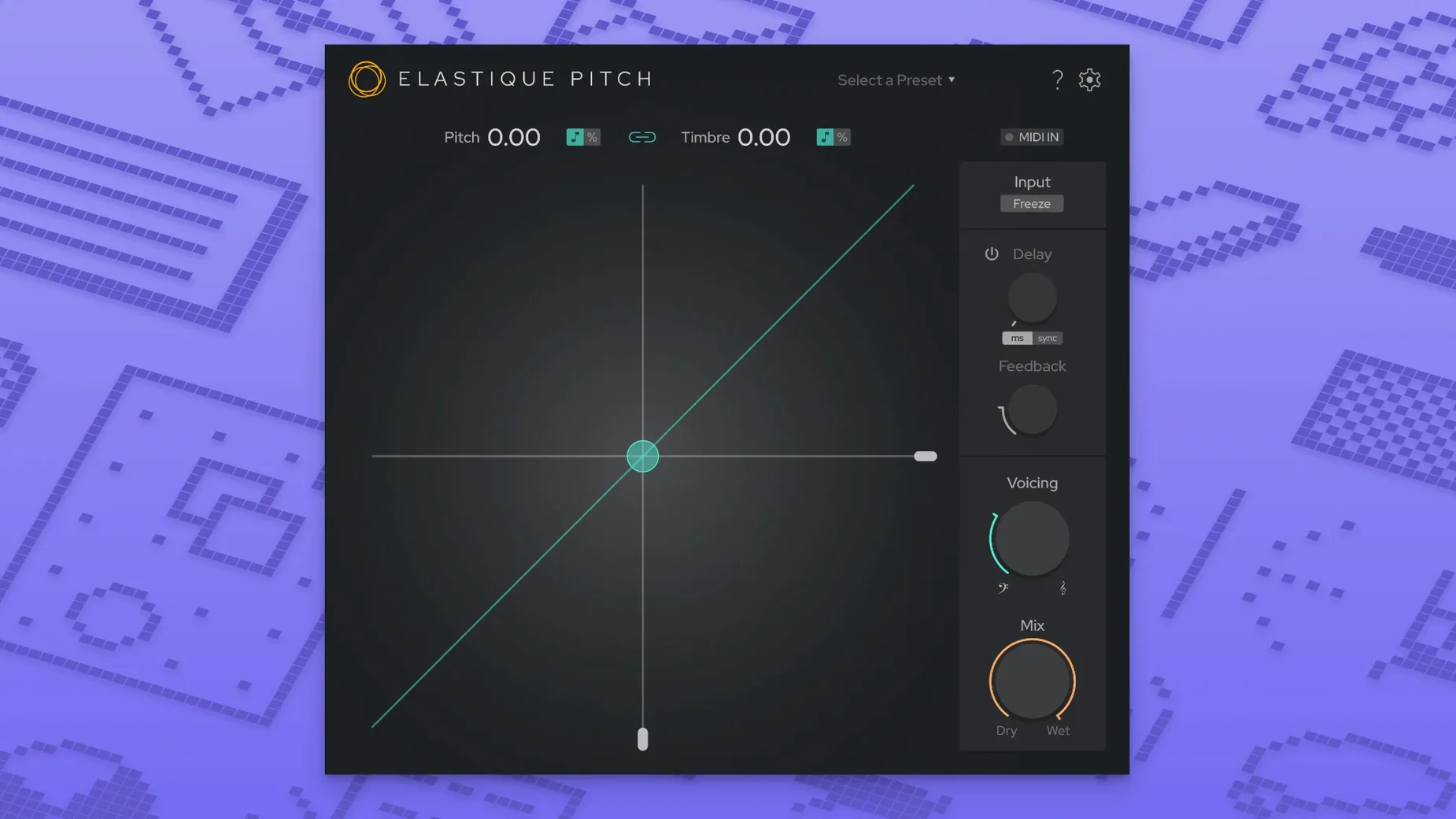
The plug-in runs on any Mac with macOS 10.15 or later, Intel or Apple Silicon, and shows up in VST3, AU, and AAX native formats. Version 2.5 also brings multichannel support up to 16 channels, so it sits comfortably on surround buses and stems, not just mono vocal tracks.
Drop it on a vocal track and it shifts pitch and formants independently in real time, with the latest ÉLASTIQUEPRO algorithm doing the heavy lifting. The formant control keeps a voice sounding natural even when you push the pitch up or down a fair bit. On background stacks it can tighten a doubled part without making it sound robotic.
On an effects return or a parallel bus, the built-in pitch-shifted echo opens up quick slapback textures and widening tricks that don't need a separate delay. It's also handy for frame-rate conversion jobs where you need to nudge the pitch of a whole stem to match a new picture edit, and the 16-channel headroom means it handles multichannel audio without extra routing.
Tweak a Couple Defaults to Make It Yours
Out of the box, elastiquePitch loads with sensible defaults, but a couple of tweaks make it feel more like your own tool right away. The redesigned interface in version 2.5 surfaces everything clearly, so you won't spend time hunting for buried controls.
The first thing I reach for is the pitch range. The default ±12 semitones covers most musical territory, but if you're doing subtle vocal doubles or tight harmonies, dial it back to ±7 or even ±5 semitones. The knob resolution tightens up, and you get finer control over small movements without accidentally jumping an octave.
Next, check the formant linking behavior. By default, formants move with pitch, which is what you want for natural transposition. But for sound design or exaggerated vocal effects, unlinking them opens up territory where a voice drops two octaves but keeps a childlike timbre, or rises into chipmunk range while staying oddly chesty. The independent sliders are the whole point of this plug-in, and leaving them locked together misses half the fun.
If you work with grouped vocals or multi-miked instruments, head to the channel configuration and make sure elastiquePitch sees the full channel count of your track. The 16-channel support means it won't silently collapse a 5.1 stem to stereo, but your DAW might default to a stereo instance. Setting it correctly here avoids surprises later.
A Specific Workflow: Vocal Doubling from a Single Take
Here's a task that comes up in home studios all the time: you've got one strong vocal take, but the chorus needs a doubled, wide sound and there's no time for the singer to lay down harmonies. elastiquePitch can build a convincing double without sounding like a chorus pedal.
Start by duplicating the lead vocal track. On the duplicate, insert elastiquePitch and set the pitch shift to +7 cents — not a full semitone, just enough to create phase movement against the original. Turn the formant shift up by the same small amount, around +5 to +8 cents, so the timbre shifts slightly without becoming a different person. Pan the original hard left and the shifted duplicate hard right.
Now add a second duplicate for a lower octave reinforcement, but only for select words or phrases. Automate elastiquePitch's bypass on this track so it only kicks in on held vowels and phrase endings. Set pitch to -12 semitones and formants to -2 semitones — the formants stay closer to the original, so it reads as the same voice thickened rather than a monster growl. Tuck this track low in the mix, just enough to add weight. The whole setup takes under five minutes and breathes life into a single take without the robotic artifacts you'd get from simple detuning.
Turning a Low Rumble Into a Screeching Alert Call
Marcus does post-production for indie sci-fi projects, and he's got a creature vocal that needs to shift from a low rumble to a screeching alert call across a single scene. He pulls the raw vocal take into his DAW, a 24-second clip of processed human breath and throat noise, and drops elastiquePitch onto the track.
He starts by drawing pitch automation that sweeps from -18 semitones up to +14 semitones over the clip's duration. The ÉLASTIQUEPRO algorithm tracks it smoothly, no glitching at the transitions. Then he unlinks formants entirely and sets them to a static -3 semitones, so even at the highest pitch the creature keeps a hollow, chesty resonance that reads as large and threatening. A touch of the pitch-shifted echo — mixed low, with feedback set short — adds a trailing grain that suggests the sound is bouncing off cave walls. He freezes a few grains in the middle of the sweep to create stutter points where the creature seems to choke, then prints the track. The whole thing stays in real time; he never bounces until he's happy. It's the kind of job that would take three separate plug-ins and a lot of routing otherwise, and here it all lives in one window.
Version 2.5 got a fresh coat of paint with a redesigned interface that's easier on the eyes during long sessions. Under the hood, multichannel support now stretches to 16 channels, and the whole thing runs on the latest ÉLASTIQUEPRO algorithm.
- macOS 10.15 or later
- Intel or Apple Silicon Mac
- VST3, AU, or AAX native host
Questions I actually get
What plug-in formats does elastiquePITCH v2 support on Mac?
It runs as a VST3, AU, and AAX native plug-in on macOS 10.15 and later, covering most modern DAWs.
Porch talk 0
Come in or pull up a chair to leave a comment.
Nobody has pulled up a chair yet. If you used it on a real Saturday, say what the hour was.
More for the same hour
Everything in VST Plugins Effectrix
1.4.8 VST Plugins
20 MB
Effectrix
1.4.8 VST Plugins
20 MB
 EZbass
1.3.3 VST Plugins
81 MB
EZbass
1.3.3 VST Plugins
81 MB
 EZdrummer
3.1.2 VST Plugins
786 MB
EZdrummer
3.1.2 VST Plugins
786 MB
 FabFilter Total Bundle
25.06.2026 VST Plugins
347 MB
FabFilter Total Bundle
25.06.2026 VST Plugins
347 MB
 Devious Machines Infiltrator
2.5.26 VST Plugins
46 MB
Devious Machines Infiltrator
2.5.26 VST Plugins
46 MB
 Cymatics VOXITY
1.0.0 VST Plugins
97 MB
Cymatics VOXITY
1.0.0 VST Plugins
97 MB
 Cymatics QUAKE
1.0.0 VST Plugins
1.6 GB
Cymatics QUAKE
1.0.0 VST Plugins
1.6 GB
 iZotope Insight
2.4.0 VST Plugins
iZotope Insight
2.4.0 VST Plugins