

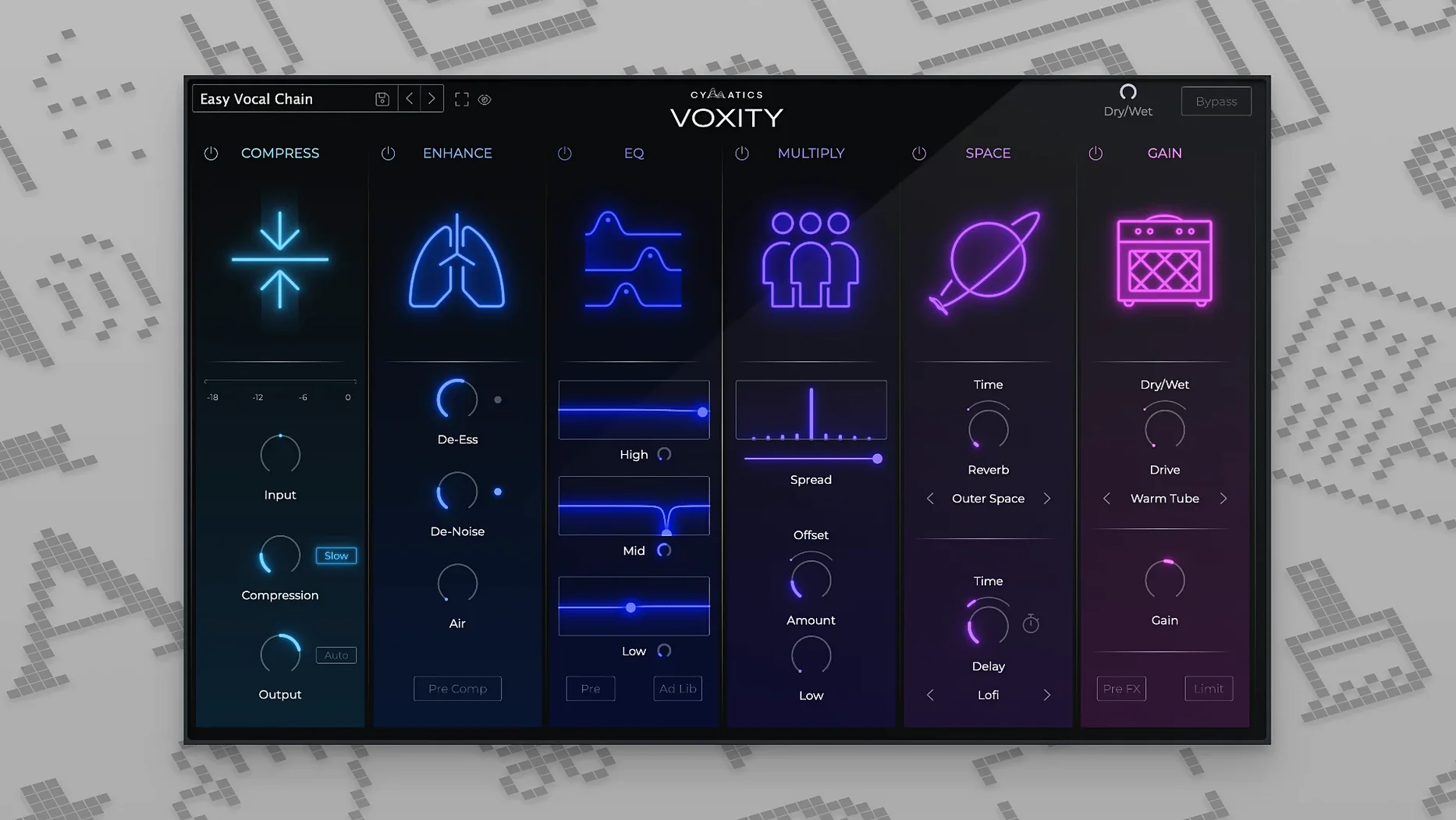
Singer-songwriters tracking at home will find a lot to like here.
Format — VST3 and AU plug-in, so it slots into Logic Pro, Ableton Live, FL Studio, and most other DAWs on the Mac.
macOS support — Runs on macOS 10.14 Mojave and every version since, on both Apple Silicon and Intel Macs. A 64-bit host is required.
What it does — Voxity is an all-in-one vocal channel strip built to take a raw recording and push it toward a finished sound without stacking five different plug-ins. Controls on the interface cover volume leveling so the vocal sits steady in the mix, plus dedicated sections for adding echo and reverb. A de-harshing stage softens sibilance and tames breathing noises that cheap condenser mics tend to pick up.
The sound — The processing leans toward the polished, radio-ready side of the spectrum rather than a dry documentary tone. The reverb tail is smooth, and the echo can be dialed from a subtle slap to something more pronounced. It is not a deep sound-design tool; it is a fast way to get a vocal from bedroom-booth raw to demo-ready in a few moves.
Fast-moving bedroom producers who chase ideas
Voxity is not trying to be everything to everyone, and that is what makes it click for a particular crowd. The folks who grin when they open it tend to fall into a few camps.
Bedroom producers moving fast. If your recording space is a closet with a foam panel or two, you know the drill: get the idea down, shape it, move on. Voxity gives you volume leveling, de-harshing, brightness, and space in one window. No chaining a separate de-esser, compressor, EQ, and reverb just to hear if the hook works. That speed matters when you are racing a creative spark.
Vocalists who mix their own demos. Not every singer wants to learn the difference between a 4:1 and an 8:1 ratio. Voxity wraps those decisions into broad, musical controls. You turn a knob labeled “Depth” or “Width” and hear the result immediately. The preset bank covers a spread of styles—tight pop, airy R&B, lo-fi indie—so you can grab a starting point and tweak from there.
Podcasters and voice-over artists on a schedule. A clean spoken-word track needs consistent leveling and a way to soften mouth noises without sucking the life out of the voice. Voxity’s de-harshing stage handles that gently, and the reverb can stay subtle enough to add presence without sounding like a cathedral. For a weekly podcast, anything that trims ten minutes from the edit is a win.
Beatmakers who occasionally lay down a hook. You might spend most of your time in the drum rack, but when you record a quick vocal or grab an acapella from a pack, Voxity gets it sitting in the mix fast. The stereo widening control is especially handy here—it pushes a doubled or single vocal out toward the edges so it wraps around a dense beat.
Turning a thin 1 a.m. demo into a finished vocal
Imagine it is 1 a.m. and a melody line will not leave your head. You grab a USB mic, open Ableton Live, and record two takes of a verse into a bare project. The raw recording is usable but thin—too much breath noise, a couple of sharp consonants, and the vocal feels like it is floating above the instrumental instead of standing inside it.
You drop Voxity onto the vocal channel. The “Clean Pop” preset gets you 80% there: the leveling grabs the quiet phrases and reins in the louder ones, the de-harsher smooths the esses without making them lispy, and the reverb adds just enough tail to give the voice weight. You nudge the brightness control up a touch because the USB mic rolled off the high end, then dial the stereo width back slightly so the verse stays centered and present. Five minutes after opening the plug-in, you render a rough bounce, send it to your phone, and listen on earbuds. It sounds like a song, not a scratch take. That is the lane Voxity lives in—turning a fragile idea into something you actually want to play for someone.
When to grab Voxity over iZotope Nectar
Voxity is not the only all-in-one vocal channel strip on the block. Knowing how it compares helps you understand when to reach for it and when another tool might fit better.
iZotope Nectar. Nectar is a deep, module-based vocal suite with pitch correction, harmonization, and a visual mixer overlay. It is powerful but carries a heavier interface. Where Voxity gives you a single page of controls, Nectar invites you into a rabbit hole of graph views and advanced unmasking features. For a fast scratch vocal or a demo, Voxity’s restraint is a feature. For surgical repair work on a lead vocal destined for a commercial release, Nectar offers more scalpels.
Waves CLA Vocals. CLA Vocals distills the Chris Lord-Alge approach into three faders—bass, treble, and compression—plus reverb and delay sends. It is even more streamlined than Voxity and shares the same “grab a sound fast” philosophy. The difference is in the processing flavor: CLA Vocals leans aggressive and rock-forward; Voxity’s tone is smoother and a bit more modern, with the stereo width and de-harshing controls giving it extra flexibility for pop and electronic styles. If your tracks want a gritty, in-your-face bite, CLA might win. If you want polished clarity without the edge, Voxity gets there quicker.
Antares Vocal Reverb (formerly “AVOX” reverb). This focuses entirely on ambience, leaving leveling and de-essing to other plug-ins. It is a specialist, not a channel strip. Comparing it to Voxity highlights what the Cymatics plug-in is really doing: bundling five or six mix stages into a single panel. If you already have a compressor and EQ you love, a dedicated reverb like Antares might slot in nicely. But when the goal is fewer plug-in slots and faster decisions, Voxity replaces four or five inserts with one.
A workflow from raw take to rough mix
Here is a reproducible sequence for shaping a dry vocal into something presentable without leaving Voxity’s interface.
- Load the vocal and pick a preset. Open Voxity on the vocal track and cycle through a few presets while the chorus plays. Listen for an overall tone that matches the vibe—ignore small details for now. The “Airy R&B” or “Indie Room” presets are good neutral starting points.
- Set the leveling. Turn the main volume-leveling control until the quiet syllables stop disappearing and the loud peaks stop poking out. Watch the gain-reduction meter if your DAW provides one; a consistent 3–6 dB of movement usually does the job without squeezing the life out of the performance.
- Dial in the brightness. Solo the vocal and sweep the brightness knob. Stop when the consonants gain clarity but before any sibilants turn piercing. If the source already has strong highs, a small cut here can warm things up instead.
- Tame harshness and breath. Engage the de-harshing stage. Start at noon and increase until sharp “s” and “t” sounds soften. Then listen to the gaps between phrases—if breath noises still jump out, push the control a bit further. Back off if the vocal starts to sound dull.
- Add depth. Raise the depth control slowly. This often blends a short ambient reverb with subtle harmonic saturation. Stop when the vocal feels grounded in the track rather than floating on top. For a drier style, keep it low; for a ballad or a sparse arrangement, a little more depth helps fill the space.
- Widen the stereo image. If the vocal is a single mono take, a touch of width can spread it slightly without losing center focus. For doubled or layered vocals, push it further. Listen in mono periodically—too much width can collapse in translation.
- Apply echo and reverb. Use the echo control for a rhythmic slap or a longer trail, syncing to the tempo by ear. Add the reverb tail last. A short plate setting with a low mix level gives presence; a longer hall works for an outro or a bridge. Blend both to taste against the full instrumental, not in solo.
- Check in context. Bypass Voxity a few times while the full mix plays. The difference should be a vocal that sits in the arrangement with body, clarity, and space—no extra plug-ins needed.
Producers hunting a voxity vocal mixing plugin free download often stumble onto packs from the same developer, like a cymatics torrent bundle, but Voxity stands out as a focused tool rather than just another sample library. If you have been digging through cymatics voxity free download pages or chasing a voxity torrent to see whether the plugin clicks with your workflow, the good news is the version floating around the community is the full 1.0.0 build—no stripped-down demo. Some searches even pull up a voxity crack that bypasses the usual gatekeeping, which means you can evaluate it on real sessions with your own vocal chains before deciding how deep the Cymatics ecosystem fits into your production style.
- macOS 10.14 or later
- Apple Silicon or Intel processor
- 64-bit host application
- Interface language: English
Questions I actually get
Does Voxity work on Apple Silicon Macs?
Yes, it runs natively on both Apple Silicon and Intel Macs through a standard 64-bit host.
Can Voxity remove breathing sounds from a vocal take?
It includes processing that specifically targets harsh sounds and breathing noise, alongside its reverb, echo, and leveling sections.
Porch talk 0
Come in or pull up a chair to leave a comment.
Nobody has pulled up a chair yet. If you used it on a real Saturday, say what the hour was.
More for the same hour
Everything in VST Plugins Cymatics QUAKE
1.0.0 VST Plugins
1.6 GB
Cymatics QUAKE
1.0.0 VST Plugins
1.6 GB
 Devious Machines Infiltrator
2.5.26 VST Plugins
46 MB
Devious Machines Infiltrator
2.5.26 VST Plugins
46 MB
 Effectrix
1.4.8 VST Plugins
20 MB
Effectrix
1.4.8 VST Plugins
20 MB
 elastiquePitch
2.5.0 VST Plugins
17 MB
elastiquePitch
2.5.0 VST Plugins
17 MB
 Cableguys Snapback
1.1 VST Plugins
37 MB
Cableguys Snapback
1.1 VST Plugins
37 MB
 EZbass
1.3.3 VST Plugins
81 MB
EZbass
1.3.3 VST Plugins
81 MB
 EZdrummer
3.1.2 VST Plugins
786 MB
EZdrummer
3.1.2 VST Plugins
786 MB
 FabFilter Total Bundle
25.06.2026 VST Plugins
347 MB
FabFilter Total Bundle
25.06.2026 VST Plugins
347 MB