People who keep a sprawling, meticulously tagged music library on their Mac often hit a wall with the default player. It’s fine for streaming, but when you’ve got tens of thousands of local files, you want something that stays snappy and doesn’t fight you on folder organization. That’s the crowd Swinsian is built for.
Mac compatibility check
Before diving into the feature set, let’s get the compatibility question out of the way. Swinsian 3.0.8 runs on any Mac running macOS 10.13 High Sierra or newer, and it’s a universal binary — so whether you’re on an older Intel machine or a brand-new Apple Silicon Mac, you’re covered. The interface is in English, and because it’s a standalone player rather than a window into Apple Music’s database, it feels refreshingly direct.
Watched folders and regex-powered tag editor
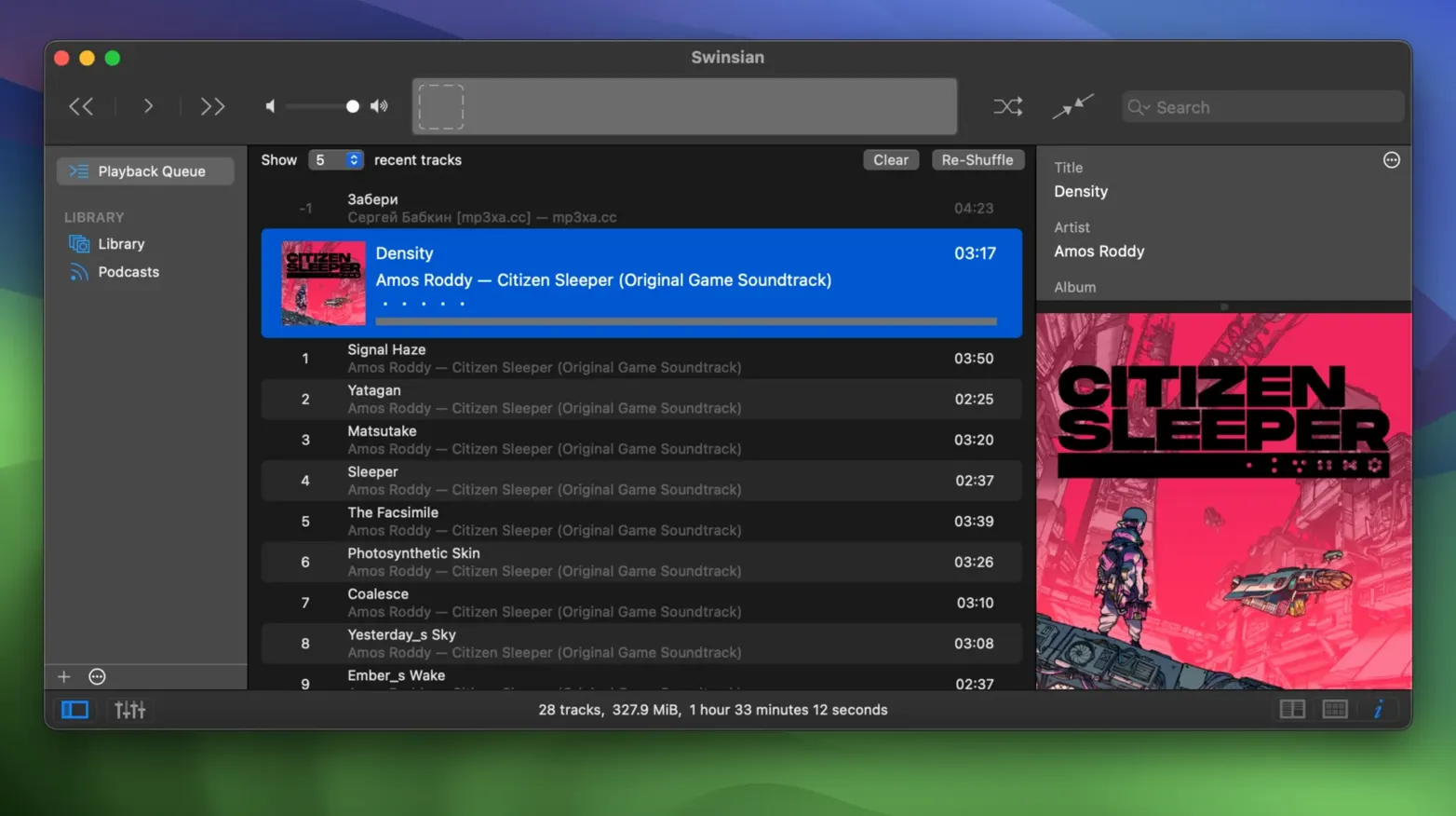
Swinsian watches folders on your drive and reflects changes automatically, so you don’t have to import things twice. The tag editor is the star here: find-and-replace with regular expressions, batch editing, and a complete-tags view that just got a sorting fix in this release. Playback features include automatic sample-rate switching so your DAC runs at the right rate, a graphic equalizer with 10 or 31 bands, and Last.fm scrobbling. Large libraries stay responsive, and you can hunt down duplicate tracks or build smart playlists without the interface grinding to a halt. If you manage your own files and care about getting tags exactly right, this is worth a look.
Cleaning up a messy library, start to finish
Say you just pulled an old backup drive into your current setup — folders everywhere, inconsistent genres, half the album art missing. Swinsian handles this kind of cleanup without making you jump between three different apps.
Point the folder watcher at the root directory and let it scan. Once everything appears, sort by the Date Added column to isolate the new arrivals. Open the duplicate-track finder first — it flags exact matches and near-matches by metadata so you can merge play counts or delete the lower-bitrate copy outright. After that, select the whole batch and open the tag editor. If the genre tags are a disaster, the regex find-and-replace does the heavy lifting: swap Hip-Hop for Hip Hop across a thousand tracks in one pass, or strip leading numbers from album titles that started life as folder names.
Album artwork comes next. Highlight the albums missing covers, right-click, and let the built-in artwork fetcher pull from its sources. For anything it can’t find — usually obscure compilations — drag a cover image from your browser straight onto the art well in the track inspector. While you’re in there, glance at the automatically-adjusted sample rate indicator in the playback bar; if your DAC supports it, you’ll see it switching track by track without a stutter.
Build a smart playlist that catches anything still missing artwork or tagged with Unknown Album, and you’ve got a living to-do list that shrinks as you chip away. Save the whole workspace as its own playlist window so you can return to the cleanup without losing your place.
Who clicks with Swinsian
Not everyone needs a player this deep, but a few types of Mac users will feel right at home.
- Local-library holdouts. If you’ve never subscribed to a streaming service and your music lives on an external SSD or a NAS, folder watching alone justifies the switch. You organize your files your way, and Swinsian follows along.
- Tag perfectionists. People who hear a wrong “Feat.” versus “ft.” and can’t let it go. The regex tag editing and the sortable Complete Tags window turn multi-hour metadata sessions into something almost satisfying.
- Hi-fi listeners with a DAC stack. Automatic sample-rate switching means no more digging into Audio MIDI Setup between albums. Combined with the 31-band equalizer and gapless playback for live recordings, it fits neatly into a desktop listening chain.
- DJs and radio people. Cue sheet support, separate playlist windows, and AppleScript control make it handy for anyone building sets or running a station from their Mac.
The through-line is control. Swinsian doesn’t push recommendations or upsell a subscription — it just gives you the tools and stays out of the way. If that sounds like how you want your music player to behave, it’s probably a fit.
What the 3.0.8 release actually changed
Point releases in the 3.x line tend to be quiet, but a few fixes in 3.0.8 matter for daily use. The art grid labels got new customization options, which means you can tweak how artist and album names sit under those big cover thumbnails in grid view — a small thing that makes browsing feel more polished. There are also hidden options for larger interface text, useful if you’re running a high-resolution display and squinting at the sidebar.
On the playback side, quadraphonic FLAC files now play correctly instead of mapping channels in odd ways — a niche fix, but if you archive surround mixes, you’ll notice. Transcoding rules stick properly now; earlier they would sometimes revert after a restart, which broke automated conversion workflows. iPod playlist management got a bug fix as well, so removing tracks from playlists on older devices no longer requires a second pass. And the Complete Tags window finally sorts columns as expected, which anyone deep in a tagging session will appreciate.
None of these changes rewrite what Swinsian is, but collectively they smooth over the kind of friction that adds up when you spend hours managing a library. The dark mode looks crisp on recent macOS versions, and the whole interface responds like an app that prioritizes the music, not the chrome around it.
- macOS 10.13 or later
- Apple Silicon or Intel 64-bit Mac
Questions I actually get
Does Swinsian work with Apple Music or streaming services?
No, Swinsian is a standalone player for your local music files. It does not connect to Apple Music or any streaming service.
Can Swinsian automatically organize my music folder?
Swinsian watches folders you point it to and updates its library when files change, but it does not rearrange or rename your actual files on disk.
Porch talk 0
Come in or pull up a chair to leave a comment.
Nobody has pulled up a chair yet. If you used it on a real Saturday, say what the hour was.