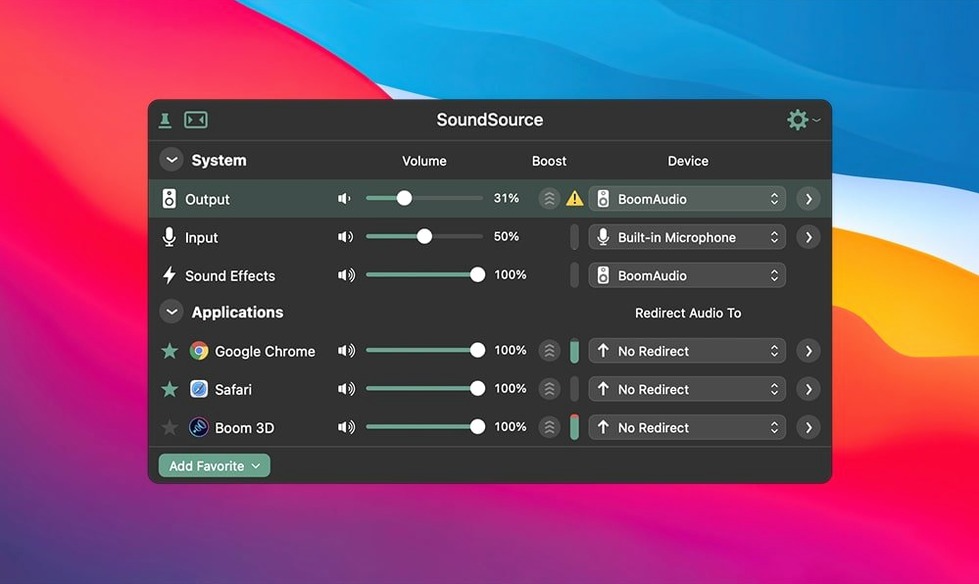
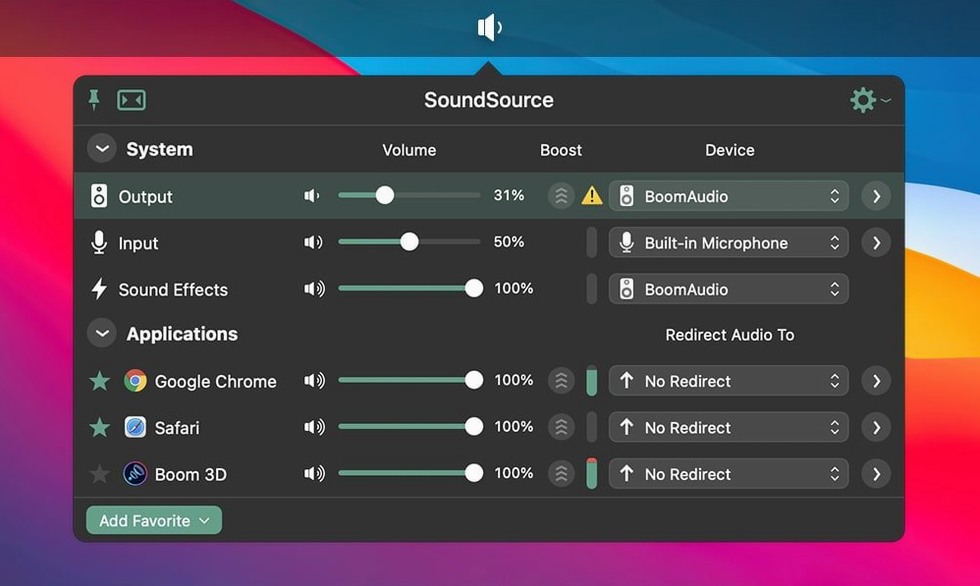
SoundSource is a menu bar utility that gives you direct control over where Mac audio comes from, where it goes, and how loud each app gets to be — without digging through System Settings.
It lives next to the apps you already run
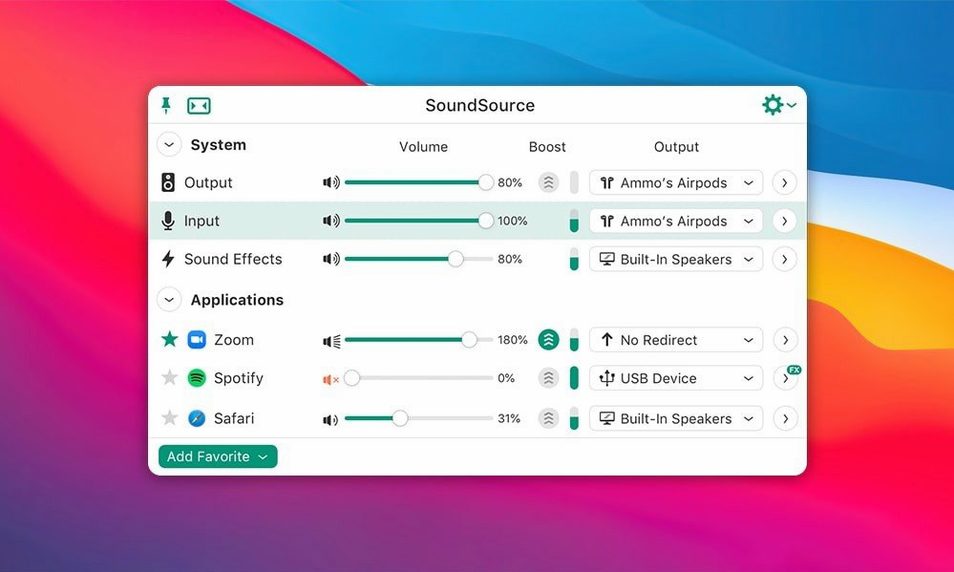
A lot of Mac audio tools try to replace your whole workflow. SoundSource doesn't. It sits quietly in the menu bar alongside the volume slider you already know, but gives it real muscle. Want to send music to your speakers while a video call stays in your headphones? Set per-app output in seconds. Need to switch your microphone from the USB interface back to the built-in array for a quick call? Two clicks from the menu bar. It works with the hardware you already have — USB mics, Bluetooth headphones, HDMI displays — and adds Output Groups so you can play audio to multiple devices at once without extra routing software.
System controls, closer to hand
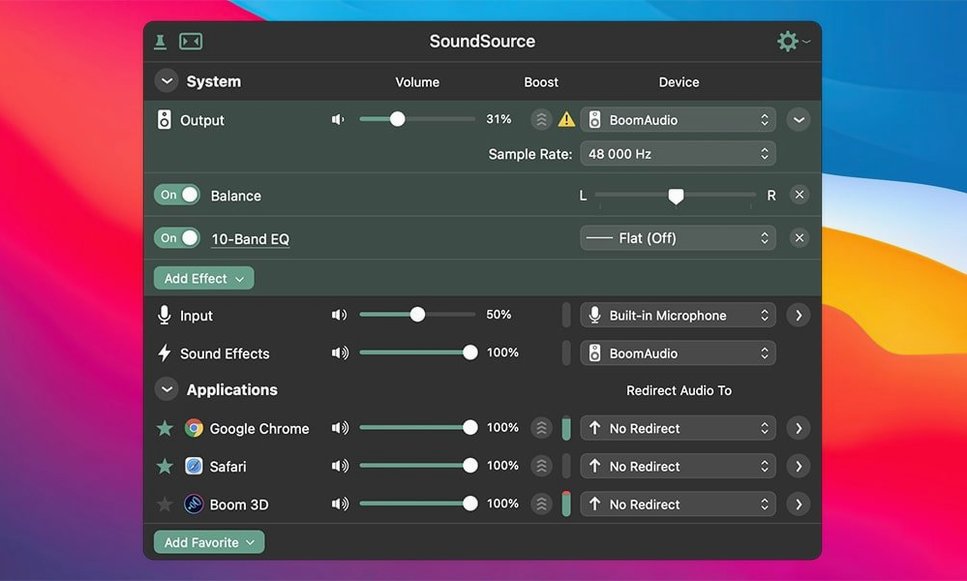
Beyond per-app routing, SoundSource pulls important Mac sound settings up from the depths of System Settings into one small panel. Input level, output volume, and the device used for system sound effects are all reachable without opening a single preference pane. The app also handles audio effects on any device, so you can apply built-in equalization or third-party Audio Unit plugins to your speakers or headphone output. Version 6 runs on macOS 15 and above, with the latest update fixing Bluetooth output performance on newer Macs. If you find yourself opening Sound settings more than once a day, this belongs next to the clock.
Remote workers juggling calls and headsets
You don't need a recording studio to appreciate what SoundSource does. The people who benefit most tend to fall into a few clear camps.
Remote workers and anyone on calls all day. If your Mac regularly juggles a headset, speakerphone, and built-in mic, the ability to switch input and output devices from the menu bar saves a surprising amount of friction. Per-app routing means Zoom can stay locked to your headset while everything else plays through the desk speakers, and you never accidentally blast a notification into a meeting.
Podcasters and streamers who aren't running a full console. SoundSource isn't a replacement for Loopback or Audio Hijack, but for solo creators it handles a lot of everyday routing. You can send your mic through a compressor or EQ plugin before it hits your recording app, or route system audio to your headphones only while keeping your speakers free for playback checks.
People with multiple audio devices on one desk. If you've got an audio interface, a USB headset, a Bluetooth speaker, and an HDMI monitor all connected at once, macOS can get confused about which one to use. SoundSource makes the current device visible at a glance and lets you hop between them without opening a single preference pane.
Headphone listeners who want a little EQ. The built-in Headphone EQ effect works per-application, so you can sweeten Apple Music without affecting how your voice calls sound. It's a small thing that makes a daily difference.
A morning of menu bar adjustments
Here's how a morning with SoundSource often unfolds — not a scripted demo, just the real rhythm of using it.
You sit down at your Mac and click the SoundSource icon in the menu bar. The panel drops down showing your current output device — maybe the USB interface you left connected overnight. You're about to join a morning standup, so you switch the output to your Bluetooth headset and the input to its built-in mic. Two clicks, done.
During the call, you notice a colleague's voice is thin through the tiny headset drivers. You open SoundSource again, click the effects area next to your headset, and toggle on Headphone EQ. The dialogue clears up immediately — no need to touch the call app's settings or dig into Audio MIDI Setup.
After the call, you want music while you work. You switch the output back to your desktop speakers for Music and leave Slack pings routed to the headset so they don't blast the room. You've already set this up once, so you recall the saved configuration — SoundSource calls it a preset — and your whole audio setup snaps into place in half a second.
Later, a friend sends a video clip you need to review. You add VLC to the per-app list, route it to your headphones, and keep the speakers playing background music. No other app on your Mac knows you're doing this; it just works at the system level.
Layers on top of Apple's audio stack
SoundSource doesn't try to take over your audio stack. It layers on top of what macOS already provides and plays well with the tools you're likely running alongside it.
With Rogue Amoeba's own apps. If you use Audio Hijack or Loopback, SoundSource sits upstream of them — it handles device selection and per-app volume before your audio hits those routing tools. The three apps complement each other without stepping on toes, and the ARK plugin that powers all of them stays in sync across updates.
With Audio Unit plugins. Any third-party AU effect you've installed — EQs, compressors, reverbs — appears in SoundSource's effects menu. You can drop FabFilter Pro-Q onto your headphone output or put a limiter on your speakers to catch sudden volume spikes. The effects chain runs transparently, and you can bypass it with one click when you need a clean reference.
With AirPlay and Bluetooth. SoundSource sees AirPlay destinations and Bluetooth devices as regular outputs, so switching between them is no different from switching to built-in speakers. On macOS 15 and later, the recent Bluetooth fixes in version 6.1.4 mean fewer dropouts and better buffer handling — especially noticeable with older Bluetooth headphones that used to stutter.
With Control Center and the menu bar. SoundSource doesn't hide or replace the macOS volume slider. It lives beside it. You can still use Control Center for quick mute, but when you need real control — device switching, per-app volume, effects — you click SoundSource instead. It feels like a native extension of the system, not a third-party bolt-on.
No kernel extensions or system file changes
A few things people usually want to know when they first hear about a menu bar audio tool like this one.
Does it install a kernel extension or mess with system files? No. SoundSource uses Apple's own audio plug-in architecture and the Rogue Amoeba ARK framework, which runs entirely in userspace. Nothing goes into the system folder, and uninstalling is as straightforward as dragging the app to the trash.
Will it conflict with my DAW or audio interface drivers? It shouldn't. SoundSource works at the macOS audio layer, not at the driver level. Your interface's control panel and any DAW routing you've set up remain untouched. If you're using a DAW with exclusive device access, SoundSource simply steps aside for that app while staying available for everything else.
Can I try it on an older Mac? Version 6 requires macOS 15 or later, and it runs natively on both Apple Silicon and 64-bit Intel machines. If you're still on an earlier macOS, you'd need an older version of SoundSource — but for most people on modern hardware, the current release is what you want.
What about the "soundsource torrent" or "soundsource mac crack" searches people do? You'll see those phrases floating around, and they can be a perfectly fine way to explore the app — just check that you're grabbing a build that includes the Bluetooth fixes from version 6.1.4 and confirm the ARK plugin is intact. A clean setup from a trusted source means you get the actual 6.1.4 release with the macOS 27 Bluetooth improvements and the updated plugin framework, so you're all set to enjoy smooth audio right away.
Does it handle system sounds separately? Yes. SoundSource gives you a dedicated control for the device used for system sound effects — alerts, UI feedback, that "swoosh" when you send a message. You can route those to a different output than your main audio, or turn them down independently. It's one of those features you don't think about until you've silenced a loud alert during a late-night session and wondered why macOS hides that setting so deep.
SoundSource 6.1.5 lands with a fresh sweep of bug fixes and behind‑the‑scenes adjustments from the developers.
- macOS 15 or later
- Apple Silicon or Intel 64-bit Mac
Porch talk 0
Come in or pull up a chair to leave a comment.
Nobody has pulled up a chair yet. If you used it on a real Saturday, say what the hour was.