You've just wrapped a shoot under tricky concert lighting, and the RAWs on your screen need more than a quick preset. You want to steer the corrections yourself, starting from a base that actually understands your lens. That's where DxO PhotoLab 9 settles into a comfortable groove.
What makes the optical corrections different here?
DxO Labs builds its DxO Modules by measuring specific camera-and-lens combinations in a lab, not just reading generic profiles. This gives you corrections for sharpness, distortion, vignetting, and chromatic aberration that are tuned to your exact gear, which you can then adjust manually to taste.
How does DeepPRIME change a RAW file?
DeepPRIME combines demosaicing and noise reduction into one deep-learning step, working on the RAW data before you even touch a slider. The result is cleaner detail recovery in high-ISO shots without the painterly look that heavy luminance reduction can leave behind.
Can I sync edits across a batch?
Yes, and it's more precise than just copying everything. You can quickly select images by subject type and synchronize only the adjustments that make sense across a set, so your exposure tweaks don't overwrite a crop you carefully set on a different frame.
Practical moves for your first few days
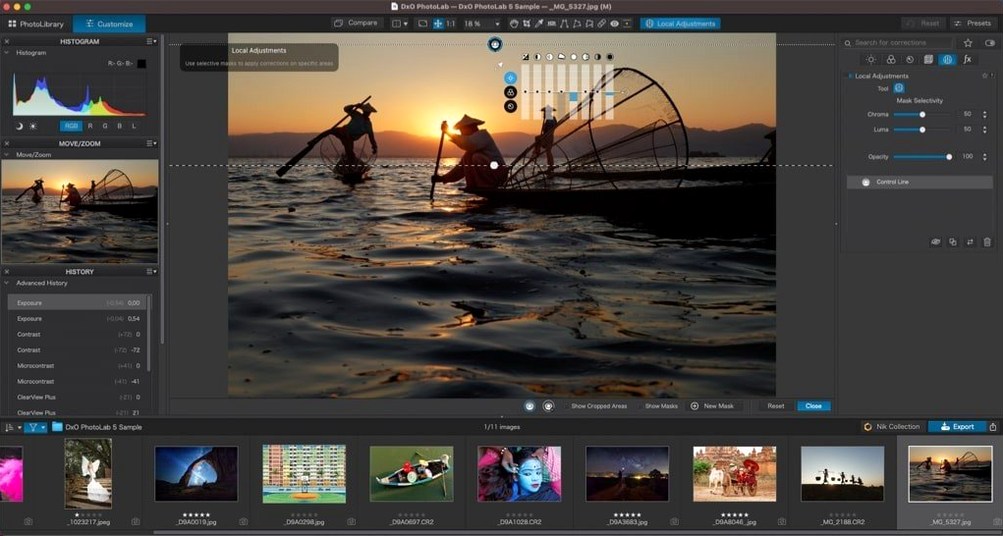
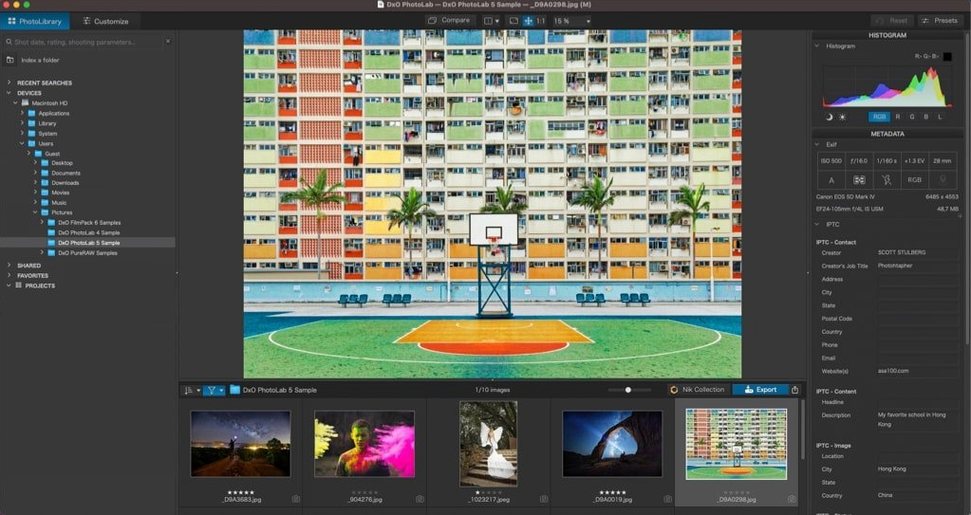
When you first launch PhotoLab 9, hold off on deep-customizing the workspace and let the default layout settle in for a session or two. The browser and customize tabs are arranged around a simple edit-shoot rhythm: cull in PhotoLibrary, then move into the Customize pane for adjustments. That flow starts to feel natural after you process a couple of memory cards.
If you're coming from another RAW developer, turn on automatic optical corrections first and leave them on while you explore the sliders. The DxO Module for your lens will quietly pull distortion and vignetting into line, which gives you a more honest starting point before you reach for Smart Lighting or ClearView. A small thing that helps early: when you open a folder of images, pick one frame that has a tricky mix of deep shadow and bright window light, and get it roughly right. Then right-click and choose Copy correction settings, select the rest of the batch, and paste only the subset of edits that fit — you can uncheck things like crop or horizon, which keeps the sync from getting messy.
Another early habit worth forming is testing how DeepPRIME behaves at different ISO steps on your own camera body. Dial the luminance slider back to zero on a noisy ISO 6400 shot, then watch what the DeepPRIME preview does on its own before you add any extra sharpening. The demosaicing stage does more heavy lifting than it appears, and knowing exactly where it leaves the grain pattern helps you avoid over-smoothing later.
Pairing with a dedicated browser instead of managing assets
DxO PhotoLab 9 doesn't try to be a full digital asset manager, and that's a strength when you pair it with something that does. Many photographers keep their library in a folder structure that a browser like Adobe Bridge or a dedicated DAM can index, then send files to PhotoLab by right-clicking and choosing Open with. The app reads the folder hierarchy directly, so you don't need to import into a catalog — the edits travel inside sidecar .dop files that sit next to your RAWs.
The support for Apple's HEIC, HEIF, and ProRAW formats means you can pull iPhone shots straight from the Photos app or a synced folder and give them the same optical-correction treatment you'd apply to a DSLR frame. On a Mac with Apple Silicon, the processing pipeline for ProRAW files uses the Neural Engine efficiently, so batch exports stay snappy even when DeepPRIME XD3 is chewing through a wedding album.
For photographers who round-trip to other editors, the export dialog makes a good handoff point. You can write a 16-bit TIFF with the corrections baked in and open it in an app that handles pixel-level retouching or advanced compositing, while the original RAW and its .dop file stay untouched. Some users searching for a photolab 9 torrent do so specifically to test this round-trip workflow before committing to a longer editing chain.
AI Masks that grab fine edges with less brushing
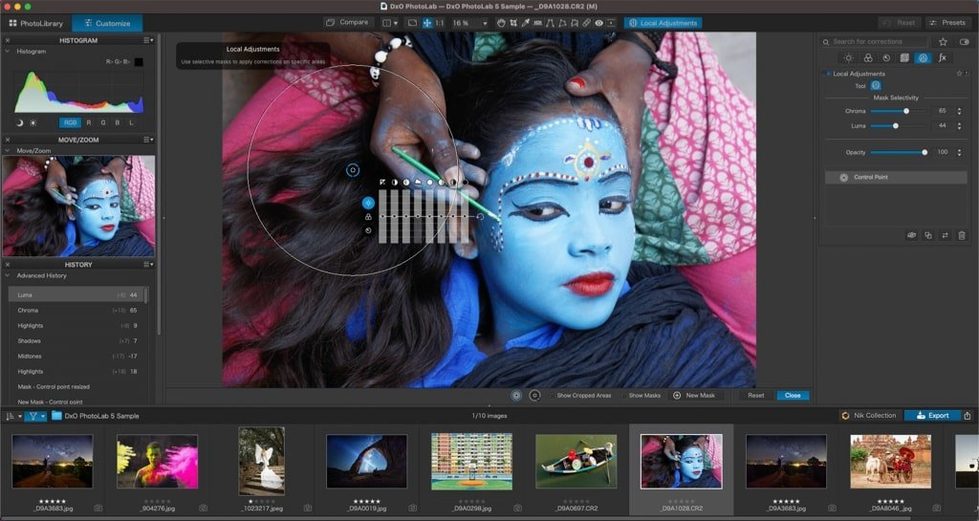
Version 9.10.0 tightened a few things that matter when you're moving fast. The subject-detection AI Masks — skies, people, backgrounds, animals — now snap a little more reliably to fine edges, which cuts down on the time you spend brushing mask borders on portraits with flyaway hair or foliage behind a bird. The quick-select sync based on subject types also got less rigid: you can pick a batch of shots that share a subject class, apply a local adjustment across them, and the masks adapt to each frame's specific shapes rather than just copying a fixed selection.
On the noise-reduction front, DeepPRIME XD3 now extends the same deep-learning treatment to both Bayer and X-Trans sensors, so Fujifilm shooters working with older bodies get the same denoising quality that Canon and Nikon users have had for a while. The difference shows up most in the fine texture retention on X-Trans files at ISO 3200 and above, where the older PRIME engine sometimes left a slight waxy residue.
Another quiet but helpful change is how the DxO Modules database interacts with the editing controls. Optical corrections land faster when you open a folder that mixes several lens profiles, and the module-matching for newer mirrorless glass released in the past year feels more confident — less manual hunting for the right profile in a dropdown. People grabbing a DxO PhotoLab 9 torrent often mention wanting to see how this updated module matching handles an eclectic lens collection without waiting for long database scans.
Under the hood, the activation handling smoothed out for offline machines, which is something you notice if you edit at a cabin with spotty internet. The app doesn't nag for a connection as aggressively as earlier builds, and the K'ed version by Antibiotics reflects that less-frequent phone-home rhythm.
- macOS 14.7 or later
- Works natively on both Intel and Apple Silicon Macs
Questions I actually get
Does DxO PhotoLab 9 include the PRIME denoising engine?
Yes, it includes DxO PRIME, alongside the newer DeepPRIME and DeepPRIME XD technologies, giving you several tiers of RAW noise reduction to choose from depending on the ISO.
How many cameras does this version support?
PhotoLab 9 processes RAW files from more than 600 digital cameras, with optical correction modules built from DxO's own lab measurements.
Porch talk 0
Come in or pull up a chair to leave a comment.
Nobody has pulled up a chair yet. If you used it on a real Saturday, say what the hour was.