You’ve mocked up the screens, the flow makes sense, but now you need to show how a transition actually feels—the curve of a fade, the timing of a tap response. You open Drama to fine-tune that interaction without switching between three different tools.
Prototype and animate in a single unified space
- A unified space for prototyping, animation, and design work, so you’re not juggling separate apps for each stage.
- Building and refining micro-interactions where precise easing and sequencing carry the personality of a design.
- Working inside a tool chain that includes PixelCut’s other software, like PaintCode, for a handoff that feels familiar.
Runs under Rosetta on Apple Silicon Macs
- The current build is Intel-only, so Apple Silicon Macs run it through Rosetta—something to know if you’re pushing heavy animation previews.
- The interface is English only, which matters in collaborative settings where the shared vocabulary of the UI matters.
- A recent fix addressed a crash on launch triggered by specific installed fonts—if you hit that wall before, version 2.1.4 resolves it.
Drama works best when you already know your way around a timeline and a canvas, and you want them in one place without the overhead of a full motion-graphics suite. If you’re deep into prototyping on Intel hardware and value direct, single-environment workflow, it’s worth a close look.
From static mockup to motion without leaving the canvas
If you’ve spent time in Sketch or Figma for interface design, you know the moment when a static mockup stops telling the story. You start looking around for something that handles motion without exporting to a separate animation tool. That’s the gap Drama tries to fill, and it sits in an odd middle ground that’s worth understanding.
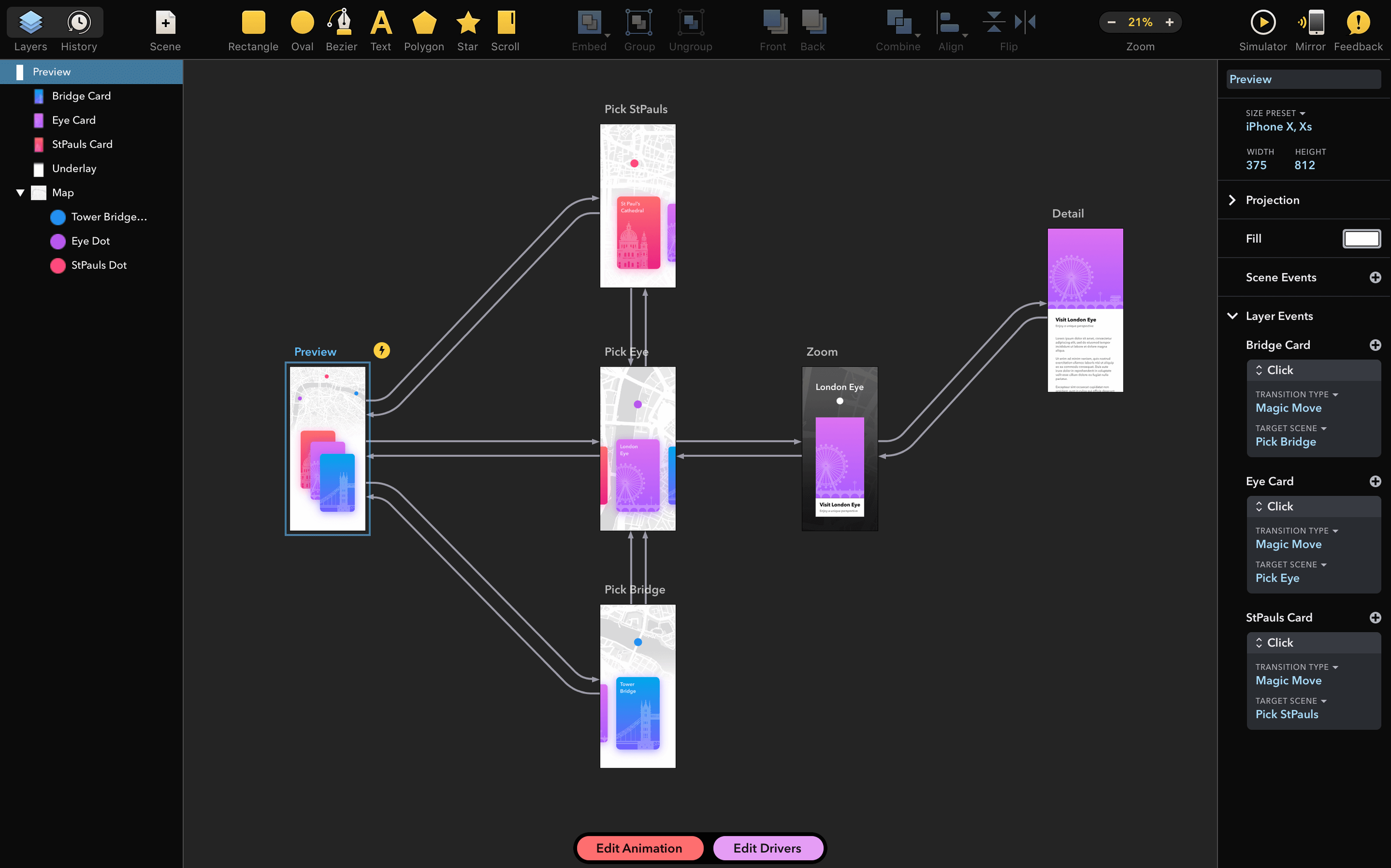
Next to Principle, the comparison gets interesting fast. Principle gives you a timeline that feels like a video editor—scrubbing, keyframes on a track, the whole nine yards. Drama takes a different approach: the animation logic lives inside the canvas, tied to states and triggers rather than a traditional timeline strip. If you think in terms of “when this button is tapped, that card slides up with this easing,” Drama maps neatly to that mental model. Principle rewards people who want frame-by-frame control; Drama rewards people who want to define behaviors and let the tool interpolate. Neither is better in the abstract—it’s about which fit feels less like work.
Against Flinto, the distinction sharpens. Flinto leans hard into screen-to-screen transitions and gesture-driven flows—perfect for quick, high-level walkthroughs. Drama goes deeper on the micro side. You can tweak an individual element’s animation curve, chain multiple property changes on a single trigger, and see the result without leaving the canvas. Flinto gets you a polished demo faster for a client walkthrough; Drama gets you closer to production-ready motion specs. If your workflow already includes PaintCode, Drama’s shared design language with that tool makes the pair feel like a natural extension, which Flinto doesn’t really attempt.
Skipping the state system breaks your animation
The first few hours with Drama can trip people up in predictable ways. The biggest one is treating it like a standard design tool and ignoring the state system. You’ll see someone build a beautiful screen, then try to animate it by dragging elements around and hoping the app just remembers the start and end positions. Drama wants you to define states first—pressed, expanded, dismissed—then wire up transitions between them. Skip that step and nothing moves the way you expect.
Another common stumble: overcomplicating the easing curves before the timing feels right. A beginner will spend twenty minutes tweaking a custom cubic-bezier on an opacity fade that lasts half a second, when dragging the duration slider to 0.4 seconds and picking “ease out” would already feel natural. Get the rhythm down first, then refine the curve. Your eyes are better at judging pacing than your brain is.
Finally, people new to the tool often pile every animation onto a single trigger without grouping or sequencing. A tap that fires six simultaneous property changes on five different layers looks chaotic. Drama lets you chain and delay actions inside a trigger, and learning to build a small cascade—this moves, then that fades, then the next thing scales—turns a janky prototype into something that feels considered. It’s a ten-minute habit shift that changes the output completely.
Stuttering canvas when GPU-hungry apps run alongside
Sometimes the canvas preview stutters on an Intel Mac with a heavy document, especially if you have other design tools open in the background. The fix is usually straightforward: close any GPU-hungry apps, drop Drama’s preview to a lower quality in the view settings, and avoid running huge retina artboards at full resolution during playback. The animations still export correctly—you’re just giving the live preview room to breathe.
Another snag that shows up: a font-related crash on launch, which version 2.1.4 specifically patched. If you’re running an older build and the app refuses to open, a corrupted or unusual system font is often the culprit. The update resolves it, so grabbing the current version from a drama for mac free download source that includes the latest patch clears the problem. In the rare case it persists, temporarily disabling suspect fonts through Font Book while launching can isolate the troublemaker.
Gatekeeper friction is a one-time hurdle with the install process. After mounting the disk image and running the Open Gatekeeper friendly script, you’ll see a Terminal prompt asking for confirmation. Press Enter, wait for it to finish, then drag Drama into Applications. Launch it once from there—if macOS throws a warning, right-click the app icon and choose Open, then confirm. After that first run, the app opens normally every time. It’s an extra minute of setup, not an ongoing headache.
Version 2.1.4 fixes a stubborn launch crash that some users ran into when specific fonts were installed on their system.
- macOS 11.5 or later
- Intel architecture (runs via Rosetta on Apple Silicon)
Questions I actually get
What is Drama by PixelCut?
Drama is a 3-in-1 Mac app for prototyping, animation, and design, made by the developer behind PaintCode.
Is Drama ready to use right after installation?
Yes, the app is ready to use as soon as you drag it to the Applications folder and open it.
Which architecture does the current version of Drama support?
The current version is an x86 64-bit app, so it runs natively on Intel Macs and via Rosetta on Apple Silicon.
Porch talk 0
Come in or pull up a chair to leave a comment.
Nobody has pulled up a chair yet. If you used it on a real Saturday, say what the hour was.