

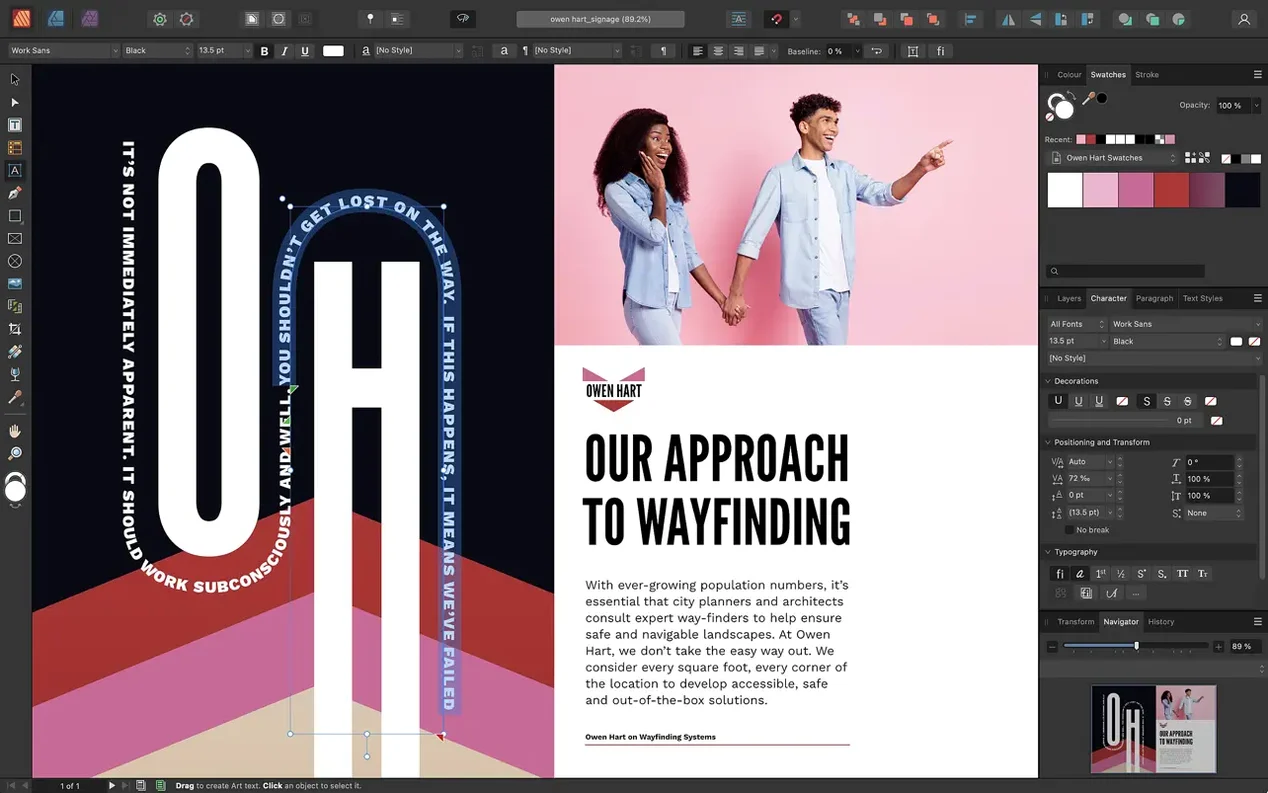
The Pen tool is where I start when a brochure needs a custom shape that simply isn't in the stock library. Affinity Publisher treats vector curves as first-class citizens, not an afterthought bolted onto a text engine. You can draw a freeform text frame, drop in a PSD mockup, and wrap body copy around it with fine-grained fill controls — all without switching to a separate illustration app.
Live PSD and AI layers right on your page
- Native file handshake. Import PSD, AI, PDF, JPG, TIFF, and PNG files directly. Adjustment layers from an Affinity Photo document stay live and editable on the page.
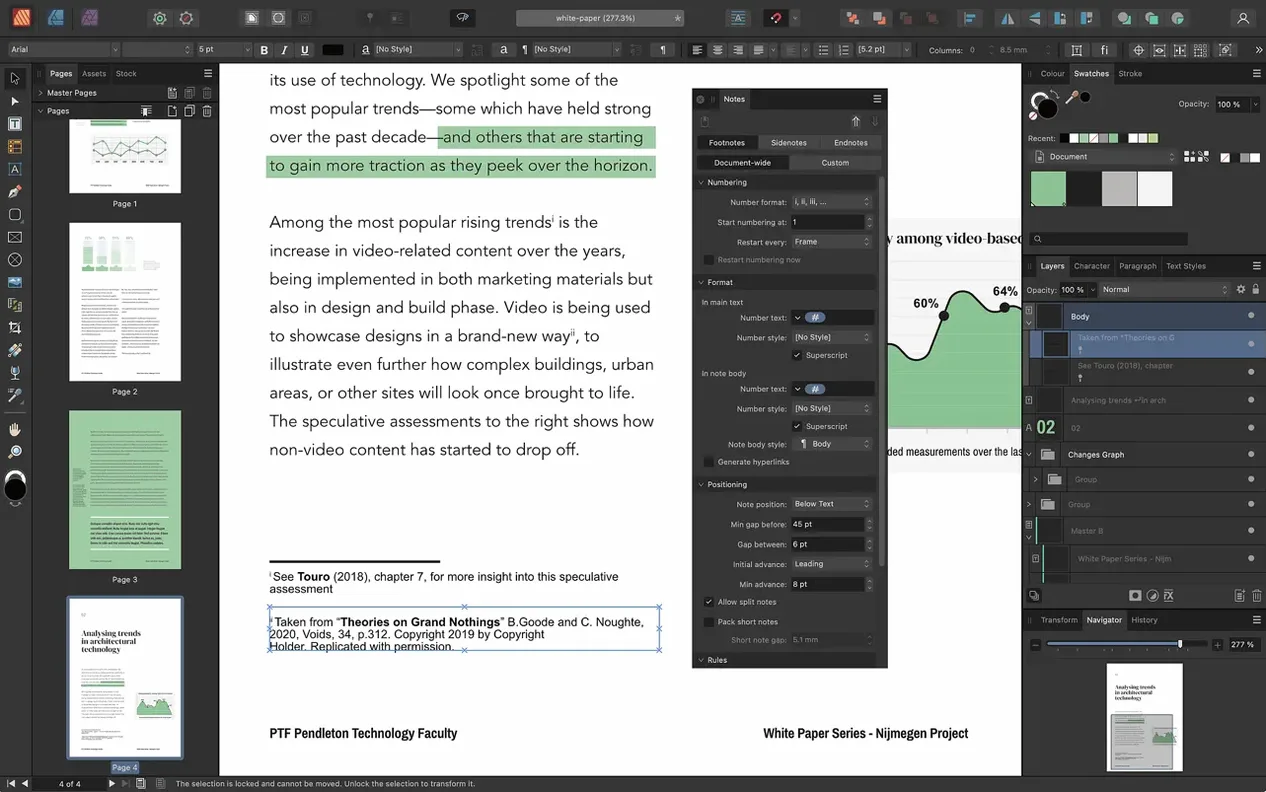
- Text engine that thinks in pages. Link multiple text frames across a document and style them with character and paragraph sheets. Drop caps, initial words, and text decorations come built in.
- Tables that behave. Custom table formats let you style a product sheet or a report without fighting invisible borders.
- Vector tools on the spread. The Pen and Node tools live right inside the layout. No round-trip to Illustrator for a quick curve fix.
What the 2.6 release changes
Version 2.6 brings multi-page spreads that finally understand print — gatefolds, trifolds, and accordion folds are all native now. The Reading Order panel adds PDF accessibility tags in a dedicated workspace, which matters if your forms and reports need to reach everyone. It runs on anything from a 2019 Intel MacBook Air on Catalina to a current M-series machine, with 8 GB of RAM keeping things comfortable.
Where it lands among other layout tools
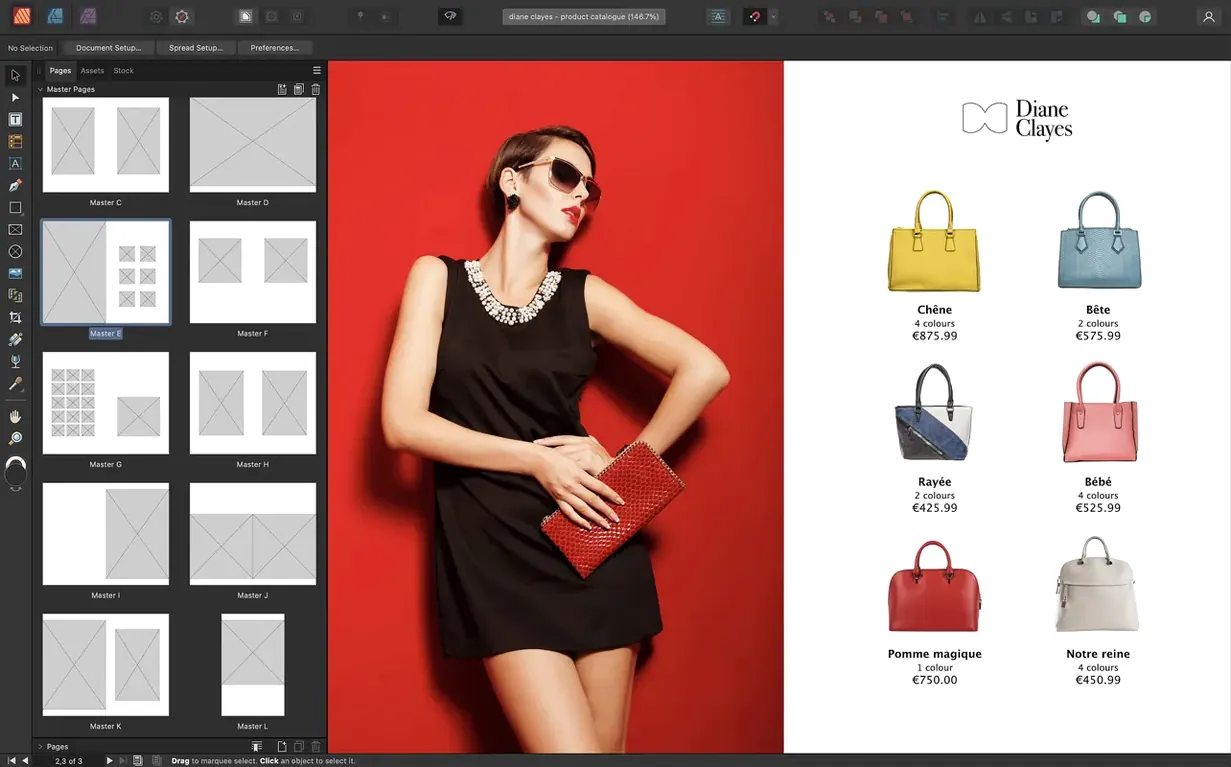
Folks coming from InDesign will recognize the floor plan immediately. Text frames, master pages, paragraph styles — the bones are the same. The difference shows up when you tweak an image mid-layout. In Publisher, a double-click on a placed photo hands control to the full Photo persona through StudioLink. No export, no round-trip, no flattened copy. InDesign requires a separate image editor and a relink dance. That alone shifts how fast a multi-image catalog comes together.
Compared to Swift Publisher, the distance is wider. Swift Publisher aims at the church bulletin and family newsletter crowd — templates galore, drag a photo in, print. Affinity Publisher expects you to know what a bleed is. You build from a blank spread, set your own guides, and manage color separations yourself. For a quick flyer, Swift Publisher gets out of the way faster. For a 40-page magazine with custom spot colors and linked text flows, Publisher is the tool that won't run out of road.
QuarkXPress still has its niche, particularly in long-book workflows and some newspaper environments. Publisher doesn't try to match Quark's XML-driven automation or its conditional styles. What it offers instead is a cleaner modern codebase — Apple Silicon native from the start — and that StudioLink connection to Designer and Photo. If your layout work is heavily visual, with illustrations and retouching happening alongside the typesetting, Affinity's trio covers more ground without leaving the document.
Paste editable Designer vectors straight into a spread
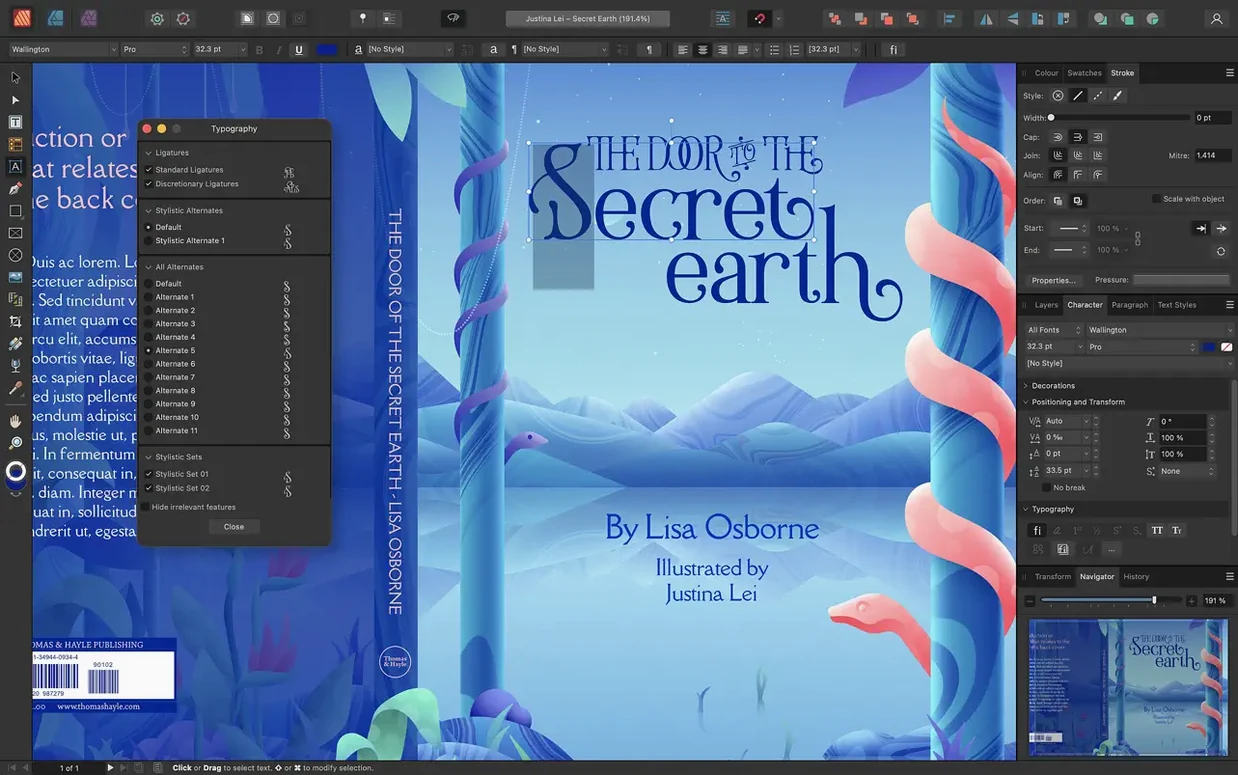
Affinity Publisher cooperates with macOS in quiet but useful ways. Copy vector shapes from Designer and paste them directly into a Publisher spread — they stay editable curves, not dead pixels. The system color picker talks to Publisher's swatches palette, so a brand color you saved in the macOS picker stays consistent across your layout, your Finder tags, and your Keynote deck. Font Book integration is straightforward: any typeface you installed for Pages or Mail appears in Publisher's font menu, complete with OpenType alternates if the face supports them.
On the export side, the PDF/X presets slot neatly into a print-shop workflow. Export a PDF/X-4 file, drag it into Preview for a quick once-over, then send it along. If you also run Affinity Photo, you can open that same exported PDF back into Photo for a final sharpening pass on the cover image before it goes to press. The three apps share a common file format, so a Publisher document with embedded Designer artboards and Photo adjustments opens cleanly in either sibling app.
Spot color work leans on the Pantone library built into Publisher. When a print vendor sends back a spec sheet calling for Pantone 286 C, you pull it from the swatch panel, apply it to a logo, and trust the separation will land correctly in the PDF. No third-party color bridge utility required.
A workflow: magazine feature spread from scratch
Say you're laying out a four-page feature for a local arts quarterly. You have a folder of unedited RAW shots from a gallery opening, a Word document from the writer, and a half-finished vector map of the gallery floor from Designer.
Open a new document, set facing pages, and add a four-page master spread. On the master, place running headers with the magazine title and page numbers, then drop in guide lines for a six-column grid. Switch to the Photo persona, open one of the RAW files, adjust exposure and white balance, and hit Save — the file stays linked and editable right on the spread. Drag the Word document into a text frame and let Publisher flow it across three linked frames spanning two pages. Pull the vector map from Designer and position it as a full-bleed background on the opening spread, then reduce its opacity so the headline punches through.
Now the details. Select the drop cap setting for the first paragraph, apply your body text style sheet, and check the text wrap around the embedded gallery photo. Open the Reading Order panel to tag the headline, body flow, and image alt-text for accessibility — easy to overlook, but the panel makes it a five-minute sweep. Export to PDF/X-4, check the separations preview to make sure your spot color on the map borders survived, and send it off.
The whole job stays inside one application. No bouncing between InDesign, Photoshop, and Illustrator while filenames multiply and link paths break.
Gray boxes from moving linked images
Ignoring the Resource Manager. Placed images stay linked by default, not embedded. A common headache: you tidy up your desktop, move a folder of photos, and suddenly your layout is full of gray boxes. The Resource Manager under the Window menu shows every linked file and its path. Beginners who never open it end up confused when a document that looked fine yesterday turns up broken today.
Using the wrong color space from the start. Publisher defaults to CMYK for print documents, but someone building a PDF meant for screen viewing might not switch to RGB until halfway through. Changing the document color space later won't retroactively fix the swatches you already applied — those deep blues you picked in CMYK will shift when converted. Set the color space before you place the first image.
Over-nesting master pages. The new multi-page spread masters in 2.6 are powerful, and the temptation is to build a Russian doll of nested masters. A master for chapter openers inside a master for the body layout seems smart until you try to adjust page numbers on a single outlier page and can't figure out which master is overriding what. Start flat, nest only when the repetition genuinely saves time, and label your masters clearly.
Forgetting the Reading Order panel. PDF accessibility is new enough in the 2.6 release that many users don't know the panel exists. Exporting a tagged PDF without checking the reading order can leave screen readers jumping from a sidebar quote to the main body in the wrong sequence. The panel sits in the Window menu and takes minutes to set up — your readers who rely on assistive tech will notice the difference.
Version 2.6 focuses on what print designers have been asking for. Multi-page spreads arrived, along with foldable layouts like gatefolds, trifolds, and accordion folds. There is also a dedicated Reading Order panel for managing PDF accessibility tags.
- macOS 10.15 or later
- Apple M-series chip or Intel processor
- 8 GB RAM recommended
- Up to 2.8 GB available hard drive space, more during installation
- Display size 1280×768 or larger
Questions I actually get
Can Affinity Publisher open Adobe InDesign files?
It can open IDML files (InDesign Markup Language) but not native INDD documents. You can also import PDF, PSD, and AI files directly.
Does it support Apple Silicon Macs?
Yes. Affinity Publisher runs natively on Macs with Apple M-series chips as well as Intel processors, requiring macOS 10.15 or later.
What kind of projects can I create with it?
You can lay out magazines, books, brochures, posters, reports, and forms. The 2.6 release added foldable spreads like gatefolds and trifolds for print work.
Porch talk 0
Come in or pull up a chair to leave a comment.
Nobody has pulled up a chair yet. If you used it on a real Saturday, say what the hour was.
More for the same hour
Everything in Mac Apps
 Affinity Photo
2.6.5 Mac Apps
789 MB
Affinity Photo
2.6.5 Mac Apps
789 MB

 AfterCodecs
1.12.1 Mac Apps
78 MB
AfterCodecs
1.12.1 Mac Apps
78 MB

 Affinity Designer
2.6.5 Mac Apps
779 MB
Affinity Designer
2.6.5 Mac Apps
779 MB

 AI Transcription
2.16 Mac Apps
5.1 GB
AI Transcription
2.16 Mac Apps
5.1 GB

 Adobe XD
59.0.12 Mac Apps
2.6 GB
Adobe XD
59.0.12 Mac Apps
2.6 GB

 Aiarty Image Enhancer
3.14 Mac Apps
129 MB
Aiarty Image Enhancer
3.14 Mac Apps
129 MB
 Adobe Substance 3D Painter
12.1.5 Mac Apps
3 GB
Adobe Substance 3D Painter
12.1.5 Mac Apps
3 GB

 Aiarty Video Enhancer
3.8 Mac Apps
182 MB
Aiarty Video Enhancer
3.8 Mac Apps
182 MB