
Producers who spend hours drawing automation lanes just to get a filter to move a certain way, or anyone who wants a synth pad to breathe with a shape that isn't a standard sine wave, reach for LFOTool. It's a plug-in that puts custom modulation curves and MIDI generation inside your DAW, and getting it running starts with knowing where it fits.
VST, AU, AAX on Intel and Apple Silicon Macs
LFOTool lands on your macOS 10.11 or newer machine as a VST, AudioUnit, and AAX plug-in. It runs on both Intel and Apple Silicon systems. Any DAW that hosts one of those formats — Logic Pro, Ableton Live, Pro Tools, Cubase, and the rest — can load it. The installer includes activation instructions, so you follow those and the plug-in shows up in your effects list.
Shaping the Sound
Once it's loaded on a track, the workflow follows a few key steps:
- Pick a preset from the dozens included to hear what the engine can do, or start from a blank slate.
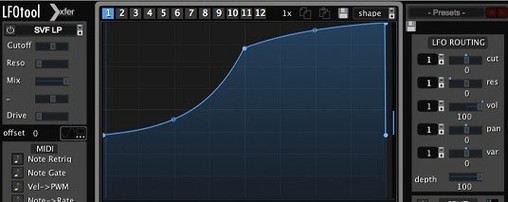
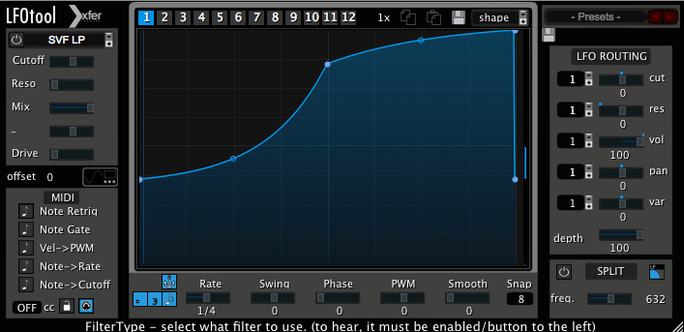
- Draw your own LFO curve in the point-and-tension editor. You click to add points and drag the tension handles to bend the shape between them.
- Assign up to four graphs to run simultaneously. A single preset can hold twelve graphs total, so you can switch between complex modulation maps.
- Set the timing. Sample-accurate sync locks the movement to your project's grid without drifting.
- Route the output to control a parameter in another plug-in via MIDI, sending the curve as a CC message stream.
The C++ core keeps the CPU hit low while the graphs run, which matters when you stack several instances across a mix. If you build your own filter sweeps, trance gates, or volume ducking patterns and want them locked to the grid with a shape you control down to the node, LFOTool is the kind of utility that becomes a permanent part of a session template.
Drawing a Shape But Hearing Nothing Change
A curve editor that responds to tension handles and sample-accurate sync invites a few predictable early missteps. One is loading LFOTool on an audio track, drawing a beautiful shape, and hearing nothing change — because the graph isn't assigned to a destination yet. The plug-in processes incoming audio but needs to know what parameter you want it to modulate. Another common slip is forgetting to set the routing for MIDI output when controlling an external synth. You draw the curve, the graph runs, but the hardware stays silent until you point the CC stream to the right channel. A third mistake is running four graphs at full depth with aggressive tension curves and expecting the CPU meter not to twitch. The C++ core is efficient, but every active graph still does work, so a quick check of which graphs actually need to run keeps a session snappy.
A Dub Techno Producer's Saturday Afternoon
Imagine someone building a dub techno track in Ableton Live. The chord stab is a sampled Rhodes run through a bandpass filter from a stock EQ plug-in. They want the filter cutoff to drift in a loose, asymmetrical way that feels like a hand on a knob, not a repeating triangle wave. They load LFOTool after the EQ, pick an empty graph, and draw a shape that rises slowly, hangs for a beat and a half, then drops quickly with a slight overshoot at the bottom. The tension handles let them round the peak and sharpen the fall so it breathes with the offbeat hi-hats. They set the rate to a dotted eighth note with a touch of swing, lock it to the project tempo, and route the graph to the bandpass frequency. A second graph nudges the resonance just a bit on the same rhythm. The result is a chord stab that shifts its tonal focus without ever sounding like a programmed loop.
MIDI CC Output vs. VolumeShaper’s Multiband Ducking
Cableguys VolumeShaper tackles the volume modulation side with a clean multi-band approach and a waveform editor that some find quicker for straight sidechain-style ducking. LFOTool goes wider — it handles volume shaping but also sends MIDI CC to any destination inside or outside the DAW, which puts it closer to a general modulation hub. MeldaProduction MMultiBandTremolo offers multiband tremolo and pan effects with a deep modulation engine, though its interface leans toward the technical and takes longer to navigate. LFOTool sits in the middle: the point-and-tension curve editor is immediate, the graph switching system means one instance holds a dozen modulation maps, and the MIDI output turns it into a bridge between an LFO shape and anything that listens for CC messages. For someone who needs a few lanes of custom modulation without patching together three different plug-ins, it hits a sweet spot that the single-purpose tools don't quite cover.
- macOS 10.11 or newer
- Intel or Apple Silicon Mac
- A host application that supports VST, AudioUnit, or AAX plug-ins
Questions I actually get
Can LFOTool send its LFO curves as MIDI messages to other plug-ins?
Yes, it can generate MIDI CC messages from its custom curves, letting you modulate parameters in other software instruments and effects.
How many modulation graphs can run at once in LFOTool?
Up to four graphs can run at the same time, though a single preset can store up to twelve different graph configurations.
Porch talk 0
Come in or pull up a chair to leave a comment.
Nobody has pulled up a chair yet. If you used it on a real Saturday, say what the hour was.
More for the same hour
Everything in VST Plugins LANDR Vocal Bundle
2025.12 VST Plugins
447 MB
LANDR Vocal Bundle
2025.12 VST Plugins
447 MB
 KORG TRITON
1.4.7 VST Plugins
586 MB
KORG TRITON
1.4.7 VST Plugins
586 MB
 KORG Collection
1.0.3 VST Plugins
175 MB
KORG Collection
1.0.3 VST Plugins
175 MB
 Komplete Kontrol
3.5.4 VST Plugins
785 MB
Komplete Kontrol
3.5.4 VST Plugins
785 MB
 Komplete FX Bundle
2026.1 VST Plugins
3.2 GB
Komplete FX Bundle
2026.1 VST Plugins
3.2 GB
 Kalifornia Dynamic KD Alkane
1.0.17.0 VST Plugins
270 MB
Kalifornia Dynamic KD Alkane
1.0.17.0 VST Plugins
270 MB
 iZotope Tonal Balance Control
3.0.0 VST Plugins
264 MB
iZotope Tonal Balance Control
3.0.0 VST Plugins
264 MB
 iZotope RX
12.1.0 VST Plugins
Updated 3.6 GB
iZotope RX
12.1.0 VST Plugins
Updated 3.6 GB