You’ve tracked a drum kit across six mics, and the raw files are sitting in a new session. Before you reach for individual EQ and compression on every channel, there’s a tidier path: group them into a folder track where the bus processing lives, then freeze the result so the CPU can breathe.
Grouping the kit with a folder track
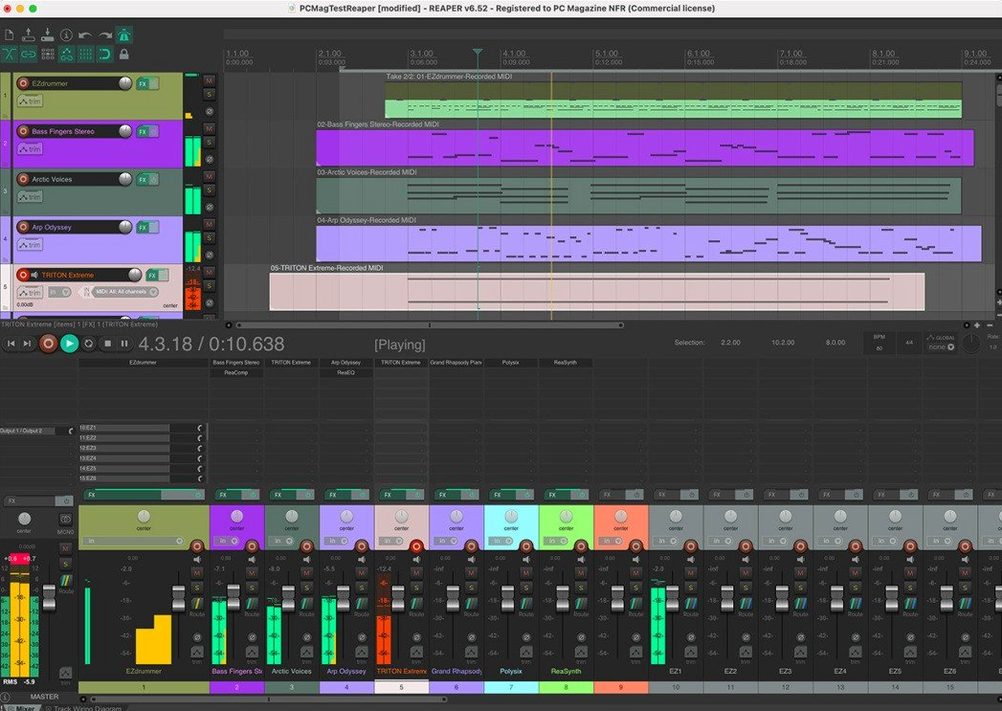
Drag the kick, snare, and overhead tracks so they sit directly under a new, empty track. Click the folder icon on that parent track, and REAPER routes the children’s audio straight into it automatically—no aux sends or internal bussing required. Drop a channel strip plug-in on the folder, and every drum hit passes through the same glue compression and saturation. The child faders still control individual balances, but the sonic imprint comes from the folder.
Freezing the drum bus non-destructively
Once the kit sounds cohesive, right-click the folder track and choose to render it to a new file. REAPER bounces the summed audio and disables the original children and plug-in chain, but keeps everything in place. You can unfreeze at any point to tweak a snare transient or swap a room mic. The frozen file behaves like a stereo stem, and the session stays nimble even on an older Intel Mac. If you’re patching together a retro laptop rig, this workflow makes tracking overdubs feel uncluttered.
Picture a voice actor with a home booth and a modest interface—a Scarlett 2i2, a single condenser, a reflection filter behind the mic. They’re not building sixty-track orchestral templates. They need to record three takes of a commercial script, comp the best phrases into one clean performance, and deliver a file that’s already loudness-normalized for the client. REAPER fits that room just as well as a full commercial studio.
Who clicks with REAPER right away
A few groups of Mac users tend to settle into this DAW faster than others. The first is the tinkerer who already builds their own pedalboards—someone comfortable chaining freeware plug-ins and saving track templates by hand. REAPER rewards that curiosity rather than hiding it behind wizards. The second is the post-production editor who lives in a timeline, trimming breaths and aligning room tone across dozens of short clips. The ripple editing and customizable mouse modifiers turn repetitive edits into muscle memory. The third is the musician running older hardware who wants a current DAW without a subscription model hanging over the session. REAPER's Intel and Apple Silicon builds come from the same installer, and the CPU footprint stays lean even on a 2015 MacBook Pro. If you've ever searched for a reaper daw torrent just to test whether your aging machine can still handle a full mix, the answer is probably yes—and once you confirm it runs smoothly, you'll find the official build keeps that same lightweight feel.
A tracking session, step by step
Let’s walk through a real Saturday afternoon: a singer-songwriter opens REAPER on an M1 Mac mini, plugs in a USB-C interface, and gets to work. Here’s how the next hour unfolds.
- New project, instant template. She loads her personal template—three tracks labeled Acoustic, Vox, and Bass DI, each with a tuner and a light compressor already inserted. REAPER remembers her last save path and sample rate, so the session is ready before the guitar is tuned.
- First pass with a click. She inserts a click source from the Insert menu, sets the tempo to 118 bpm, and records a scratch acoustic take. The metronome counts off two bars, and the waveform paints across the arrange view in real time.
- Comping on the fly. She loops the verse section and records three vocal passes into the same track. REAPER stacks the takes in lanes. With a quick swipe across the best phrases, the comp builds visually—no cutting and dragging required.
- Adding virtual drums. She drops a free drum sampler onto a new track, draws a simple MIDI kick-and-snare pattern in the piano roll, and nudges a few hits off the grid with the mouse. The whole arrangement sits in one window, audio and MIDI side by side.
- Rough mix and render. Levels get a quick push, a room reverb on a shared bus, then File > Render. She picks MP3 for a reference bounce, and REAPER writes the file to her desktop in seconds. The session stays open for revisions later.
Podcast repair workflow, from file import to final bounce
Here’s a specific task: a podcaster has a forty-minute interview recorded on a portable recorder. The guest’s track has chair squeaks, the host’s track has plosives, and the room tone shifts halfway through. REAPER handles all of it inside one project.
Start by dragging the stereo file onto a blank session. REAPER asks whether to split it to separate tracks—choose yes, and the dual-mono source becomes two lanes, host left and guest right. Insert a spectral edit plugin on the guest track, highlight the squeak frequencies, and attenuate them without touching the voice. On the host track, drop a high-pass filter at 80 Hz to tame the plosives, then add a downward expander to push the noise floor lower between phrases.
For the room tone shift, split the host track at the moment the air changes, then apply a gentle noise print from the earlier section to the later one using REAPER’s built-in ReaFir in subtract mode. The transition becomes invisible. Finally, select both tracks, run the normalize function to hit -16 LUFS, and render a mono MP3. The whole repair pass takes under fifteen minutes once the workflow is familiar. If someone stumbled onto the program while looking up a reaper mac torrent, they’d find this kind of surgical editing ready to go without hunting down extra extensions.
- macOS 10.15 or later
- Apple Silicon or Intel processor
Questions I actually get
Does REAPER limit how many tracks I can route into a folder?
No, there is no fixed limit on track count or routing. You can nest folders inside folders and use up to 512 channels of loopback audio if needed.
Can I still edit the individual drum tracks after freezing the folder?
Freezing is non-destructive. You can unfreeze the folder at any time to adjust the child tracks, then re-freeze the processed result.
Will this run on an older Mac?
REAPER supports macOS 10.15 and later on both Intel and Apple Silicon Macs, with no separate track or bus types to complicate lighter sessions.
Porch talk 0
Come in or pull up a chair to leave a comment.
Nobody has pulled up a chair yet. If you used it on a real Saturday, say what the hour was.