
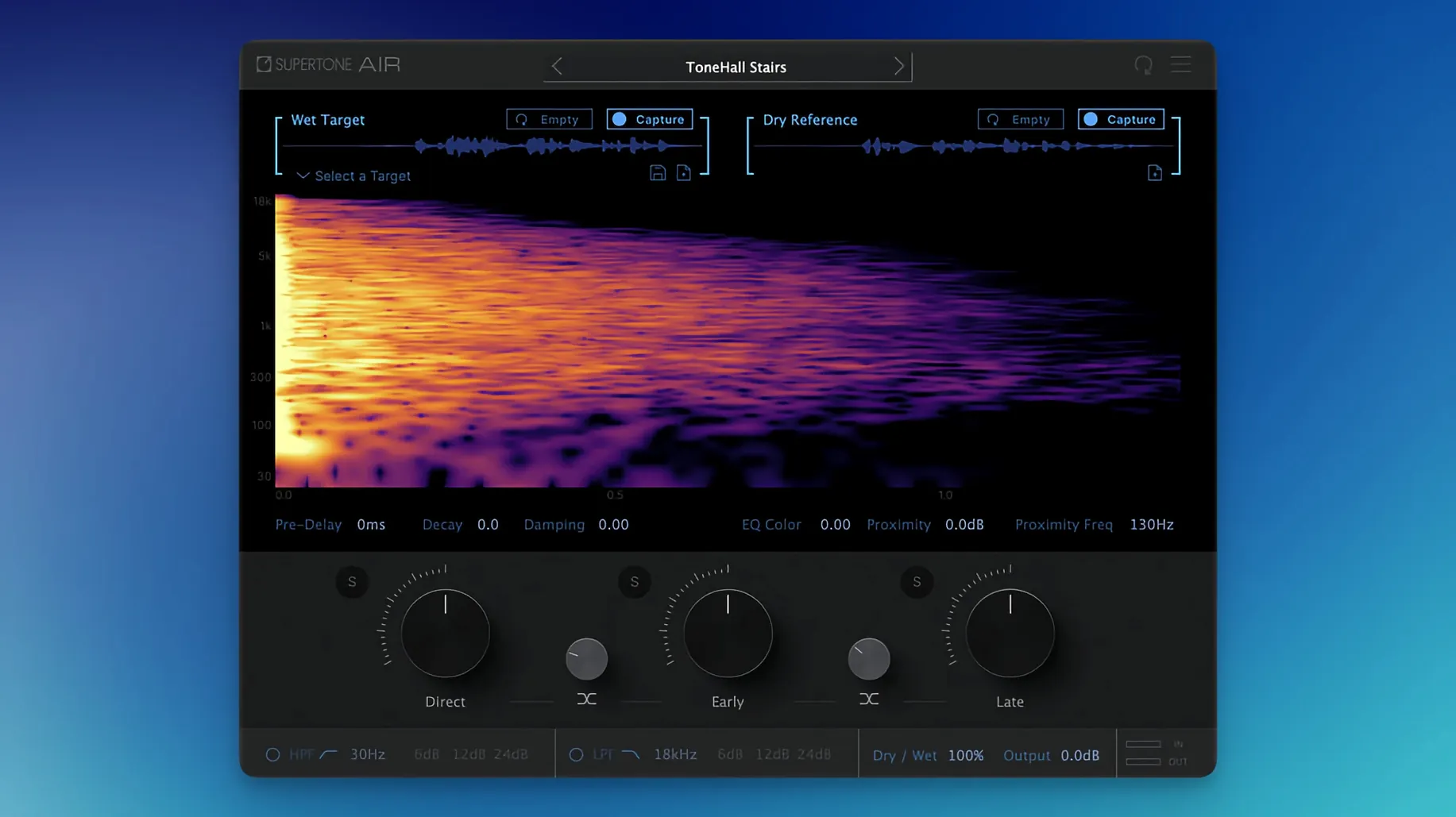
A session comes back from the edit with a line that was recorded in a hotel room on a portable rig, and it has to sit next to dialogue captured on a soundstage. That mismatch in space and tone is exactly the problem Supertone Air was built to solve. It’s a dedicated dialogue match plug-in that pairs reverb and equalization matching, designed to pull ADR and field recordings into the same sonic world as the production audio.
- What does it actually match? Air learns the reverb and EQ profile of a reference clip, then applies that profile to a target clip so they feel like they were recorded in the same space.
- Is it a real-time plug-in? No — it’s optimized for offline processing inside Pro Tools AudioSuite, where you render the match directly into the clip.
- Can you tweak the reverb after the match? Yes. Controls for decay, damping, and proximity let you fine-tune the tail without losing the captured character of the room.
- Does it handle early and late reflections separately? It gives you faders for direct, early, and late reflections, so you can shape how the voice sits in the virtual space.
- Can you save a captured space? The plug-in exports captured impulse responses as WAV files, which is handy if you want to archive a location’s signature or use it in another session.
- Does it run on Apple Silicon? Yes, it has native support, and it also works on Intel Macs running macOS 10.13 or later.
If your ADR workflow still involves manually chasing a reverb tail while squinting at an EQ curve, Air turns that into a few clicks. It’s worth a look for dialogue editors who spend real time matching field recordings and alternate takes.
A Matching Workflow from Start to Finish
You’ve got a reference clip from the boom mic on location — a few seconds of room tone with a bit of the actor’s voice tailing off — and a dry ADR take recorded in a treated booth. Here’s a workflow I’ve settled into with Air.
First, load the plug-in on the dry clip in AudioSuite. Click the Capture button and play the reference selection. Air listens for about two to three seconds, analyzing both the reverb tail and the spectral shape of the space. A small waveform thumbnail appears once capture is complete, confirming it grabbed something usable.
Next, hit Preview Match. At this stage, don’t touch any faders — just listen to how Air places the voice in the captured space. Pay attention to the early reflections; they’re usually what makes a booth recording feel disconnected from a living room or a car interior.
Now shape the result. Bring down the Early fader slightly if the voice starts to sound boxed in. If the tail feels too present, shorten the decay by pulling the Decay control left. The Proximity slider is subtle but useful: push it negative to pull the voice slightly forward in the space, or positive to seat it deeper. Once it sits right, render the clip and move on.
I save the captured profile to disk via the export function for anything I might reuse — a recurring apartment interior, a vehicle cab, a hallway the production revisits. Profiles are tiny files and load back instantly.
How Air Compares with Similar Tools
Dialogue matching isn’t new, but the approaches differ enough that it’s worth understanding where Air lands. I’ve spent time with a few alternatives, and here’s how the picture looks.
iZotope Dialogue Match — part of RX Advanced — covers EQ, reverb, and ambience matching in one module. It gives you more granular EQ control than Air, with individual bands and a learn curve display. It also works as an AudioSuite process. Where Air pulls ahead is speed: Dialogue Match needs careful reference selections and sometimes multiple passes to lock in the reverb profile, while Air’s neural capture is faster and more confident on the first try. Dialogue Match also benefits from having RX’s noise-reduction backbone behind it; Air is strictly a reverb and EQ matcher without denoising capabilities, so you’ll want a separate tool for that.
Accentize Chameleon uses an algorithmic matching engine with a spectral mapper. It’s more of a general-purpose match EQ that can do dialogue and ADR, but it doesn’t model reverb as a distinct component — you get a static EQ curve without reflection control. For purely timbral matching, Chameleon works well; for spatial matching, Air’s direct/early/late split makes a genuine difference when the reference has a recognizable acoustic signature.
Where Air stands out is that it treats the problem as an acoustic scene, not just a frequency profile. That neural network approach yields matches that feel less like an EQ preset slapped onto a dry signal and more like the voice was recorded in the same room. The trade-off is that it’s dialogue-focused and won’t help you with music or effects matching, which some alternatives can handle.
A Re-Recording Mixer’s Quick Fix
Consider a re-recording mixer on a low-budget feature. Picture lock arrives, and the director flagged a scene where the lead actor’s lav mic popped during a turn, so production sent an alternate take recorded on a different day, in a slightly different corner of the set. The room tone doesn’t quite match, and there’s no budget for a full ADR session.
They pull the original take into Air as the reference, capture the reverb and EQ profile in a few seconds, apply it to the alternate take, and drop the early reflections by a couple of decibels to compensate for the lav’s different placement. The result doesn’t call attention to itself — it just sounds like the scene continues. That’s the kind of situation where a plug-in like Air earns its place in a template. If you’ve been hunting a supertone clear mac torrent to test the workflow before committing, the current build includes the profile export improvements that make saving room signatures painless.
Version 1.0.1 is a quiet maintenance update. The plug-in file name was changed from Air to Supertone Air for clarity, and an installation conflict that affected users who had Sound Particles Air installed was resolved.
- macOS 10.13 or later
- Apple Silicon or Intel processor
- Pro Tools (AudioSuite)
- Supports 44.1 kHz, 48 kHz, and 96 kHz sample rates
Questions I actually get
What is the difference between Supertone Air and Supertone Clear?
Air is a dialogue match plug-in for reverb and EQ matching, built for ADR workflows in Pro Tools AudioSuite. Clear is a separate voice denoising plug-in by the same developer.
Can Supertone Air run on Intel Macs?
Yes. It supports both Apple Silicon and Intel processors, and requires macOS 10.13 or later.
What sample rates does Supertone Air support?
It supports 44.1 kHz, 48 kHz, and 96 kHz sample rates.
Porch talk 0
Come in or pull up a chair to leave a comment.
Nobody has pulled up a chair yet. If you used it on a real Saturday, say what the hour was.
More for the same hour
Everything in VST Plugins Superior Drummer
3.4.4 VST Plugins
625 MB
Superior Drummer
3.4.4 VST Plugins
625 MB
 Synapse Audio The Legend HZ v2.0.2.R1
2.1 VST Plugins
472 MB
Synapse Audio The Legend HZ v2.0.2.R1
2.1 VST Plugins
472 MB
 Strymon Plugin Bundle
2026.02 VST Plugins
427 MB
Strymon Plugin Bundle
2026.02 VST Plugins
427 MB
 T-RackS
6.3.2 VST Plugins
2.3 GB
T-RackS
6.3.2 VST Plugins
2.3 GB
 Steinberg SpectraLayers Pro
13.0.20-All-in-One VST Plugins
3.9 GB
Steinberg SpectraLayers Pro
13.0.20-All-in-One VST Plugins
3.9 GB
 SSG Audio Optimus
1.5.143 VST Plugins
58 MB
SSG Audio Optimus
1.5.143 VST Plugins
58 MB
 Spire
1.5.19 VST Plugins
158 MB
Spire
1.5.19 VST Plugins
158 MB
 Sonic Academy KICK
1.1.8 VST Plugins
358 MB
Sonic Academy KICK
1.1.8 VST Plugins
358 MB