

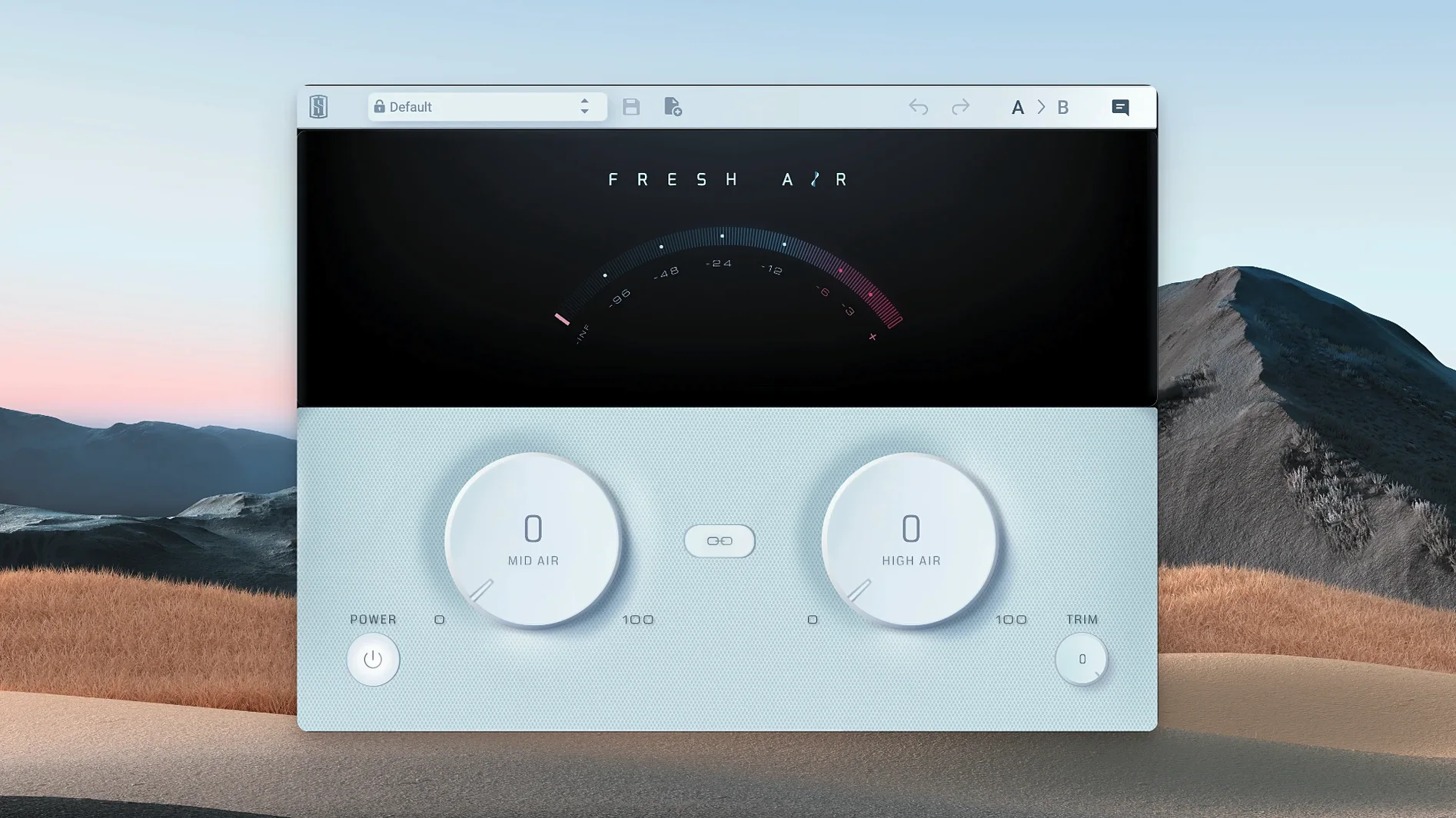
Mix engineers who already have their gain staging and compression locked in often reach for Fresh Air when a vocal or drum bus feels present but not quite open. It is a focused tool for the top end, built on the character of vintage exciter circuits rather than a standard shelving EQ.
Mid Air and High Air
The two main knobs split the work into distinct zones. Mid Air adds presence in the upper-mids, which helps a snare cut through a dense arrangement or brings a lead vocal forward without harshness. High Air handles the air band itself, adding shine to cymbals, acoustic guitars, or the overall mix. Because the processing is dynamic, the effect responds to the source instead of simply boosting a fixed shelf.
Trim control
The Trim knob matters more than it might seem at first glance. Adding high-frequency energy can shift perceived loudness, so having an output level adjustment right on the interface keeps gain staging honest. Download Fresh Air plugin for Mac if you want a simple exciter that fits into an existing workflow without adding clutter.
Let the high end settle before stacking it everywhere
When you drop a new exciter into your plugin folder, the instinct is to slap it on everything and twist knobs until the room sparkles. Resist that for the first afternoon. The real muscle of this processor shows up once you learn what it does not do — it will not fix a dull recording that needs broad EQ work, and it will not rescue a harsh cymbal track that was tracked too hot.
A better first exercise: pull up a mix you know well, bypass every other processor on the master bus, and listen to what Mid Air and High Air do at conservative settings, say 10 o'clock on each knob. Toggle the Link button on and off. With linking engaged, the two bands move together, which can feel more like tilting the top end of the whole mix. Unlinked, you get independent control — useful when a vocal needs presence but the overheads are already bright enough.
Spend twenty minutes on a single snare track. Push Mid Air until the attack cuts through, then back it off until you barely notice the knob is working. That barely-there zone is where Fresh Air lives in daily use. Also worth trying early: run a dull keys bus through it with High Air at noon and Trim pulled back a couple of decibels. The perceived loudness jump can fool you, so get comfortable resetting Trim by ear before you trust the meters.
Lifting a dense pop mix out from behind the curtain
Sasha has a dense pop mix open — drums, bass, stacked vocals, a Rhodes part that keeps getting buried. The arrangement is right, but the overall picture feels like it is behind a thin curtain. Compression and EQ are already doing their jobs, so she reaches for something that adds texture rather than gain.
She inserts Fresh Air on the drum bus first. The snare has body from a 200 Hz boost earlier in the chain, but the transient lacks snap. Mid Air goes to 9 o'clock. Immediately the stick attack pokes through the guitars. High Air stays low — the overheads are already generous above 10 kHz, and she does not want to make the cymbals brittle.
Next, the lead vocal. The performance is warm, almost too rounded. Sasha unlinks the knobs and nudges Mid Air to 11 o'clock. The vocal lifts forward, consonants sharpen, but there is no sibilance spike because the dynamic processing eases up where a static shelf would keep pushing. She checks the Trim knob and pulls it down 1.5 dB to match the level with the plugin bypassed. The difference is not louder — it is more open.
On the master bus, she adds a final instance with both knobs linked at 8:30. It is a whisper of air across the whole mix, the kind of change you feel more than hear. She toggles bypass. The mix collapses slightly — not in level, but in dimension. She leaves it engaged and exports.
Try Mid Air before reaching for a high-shelf
Fresh Air sits in a specific slot between corrective EQ and broad saturation. Before you reach for a high-shelf on your channel strip, try Mid Air first on a vocal or snare — the dynamic response often does less damage to transients than a static boost. After that, your EQ moves can be smaller and more surgical.
It pairs well with macOS's built-in audio routing when you are monitoring through something like BlackHole or Loopback for quick A/B comparisons outside the DAW. Drop an instance on the monitoring chain, bypass it periodically, and check how the top end translates to consumer headphones. The Trim control makes this safer because you are not accidentally fooling yourself with volume differences.
In a plugin chain, Fresh Air works best post-compression and pre-limiter. Compression evens out the dynamics that the plugin reads, so the effect stays more consistent. Placing it before a limiter on the master bus lets you add air without pushing the limiter into over-reaction — the Trim knob gives you that final gain-stage tweak before the brick wall.
Eight instances, forty tracks, no CPU nudge
On an Apple Silicon Mac running macOS 11 or later, Fresh Air 1.0.9 loads instantly and sits light in the session. In a project with forty-plus tracks, adding an instance on eight or ten channels does not nudge the CPU meter in any noticeable way. The interface draws quickly — two knobs and a button, no animated graphics to tax the GPU — so there is no lag when you open the plugin window during playback.
Stability has been uneventful in the best sense. Across Logic Pro, Ableton Live, and REAPER sessions, there were no sudden dropouts or validation hiccups. If you are searching for a fresh air mac download that runs clean on ARM hardware, this one behaves like a utility rather than a resource hog. The plugin recalls settings correctly after saving and reopening a session, and automation of the Mid Air and High Air parameters is smooth — no zippering noise when riding the knobs in real time.
Memory use is modest. Even with multiple instances across a large mixing template, the footprint stays low enough that you can keep it active while tracking, which is handy if you print stems with processing. The only caution worth mentioning is the Trim knob — because it sits inline rather than as a wet/dry mix control, you will want to A/B at matched levels to judge what the processing is actually doing. A quick bypass with Trim adjusted by ear keeps your decisions honest.
- macOS 11 or later
- Apple Silicon
- English interface
Porch talk 0
Come in or pull up a chair to leave a comment.
Nobody has pulled up a chair yet. If you used it on a real Saturday, say what the hour was.
More for the same hour
Everything in VST Plugins Slate Digital Murda Melodies
1.1.1 VST Plugins
179 MB
Slate Digital Murda Melodies
1.1.1 VST Plugins
179 MB
 Slate Digital Storch Filter
1.0.6 VST Plugins
69 MB
Slate Digital Storch Filter
1.0.6 VST Plugins
69 MB
 Slate Digital Submerge
1.0.5 VST Plugins
38 MB
Slate Digital Submerge
1.0.5 VST Plugins
38 MB
 Sonic Academy KICK
1.1.8 VST Plugins
358 MB
Sonic Academy KICK
1.1.8 VST Plugins
358 MB
 ShaperBox
3.6.1 VST Plugins
111 MB
ShaperBox
3.6.1 VST Plugins
111 MB
 Serum
2.1.5 VST Plugins
Updated 1.2 GB
Serum
2.1.5 VST Plugins
Updated 1.2 GB
 Spire
1.5.19 VST Plugins
158 MB
Spire
1.5.19 VST Plugins
158 MB
 Serato Sample
2.2.0 VST Plugins
612 MB
Serato Sample
2.2.0 VST Plugins
612 MB