
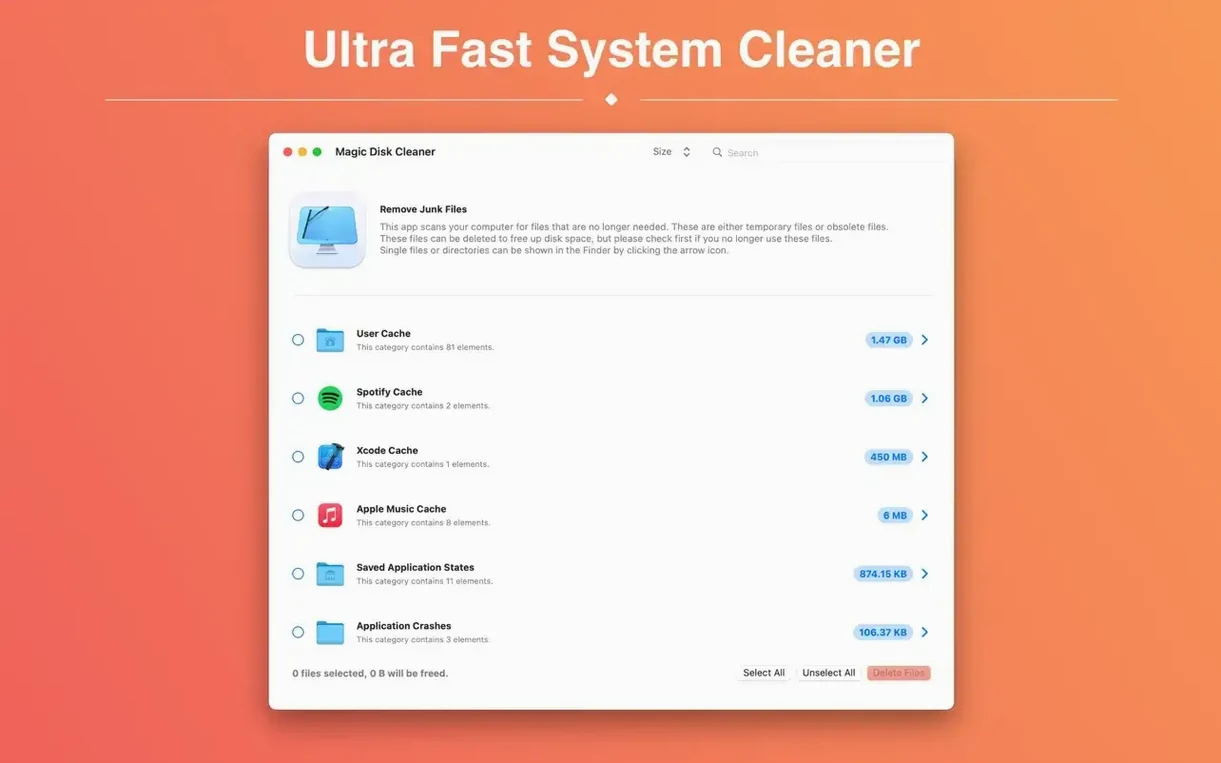
It starts scanning the second you open it. No setup screens, no configuration wizards — just an immediate tally of developer caches, mail downloads, and iOS software updates sitting forgotten in hidden folders. That directness is what gets people asking questions. What exactly does it touch? Can a single click cause trouble? The short answer is that Magic Disk Cleaner draws a hard line: it only looks at temporary system and application caches, and it never deletes a single file without you hitting the button.
| Detail | Info |
|---|---|
| Current version | 5.4.0 |
| macOS requirement | macOS 15.6 or later |
| Apple Silicon / Intel | Both |
| Languages | 10, including English, German, Japanese, Spanish |
Once the list populates, you glance at what's eating space, uncheck anything you'd rather keep, and let the single clean-up button do the rest. There's no scheduling, no real-time monitoring, and no trial period to manage. It's a utility that does one job quickly and gets out of the way. If you've noticed your free space shrinking and suspect stale caches are the culprit, this is the kind of tool you run once a week and forget about in between.
Photographers who bounce between Lightroom catalogs and raw-file exports get an outsized benefit, because Adobe’s cache folders balloon without much warning. A week of editing can quietly pile up several gigabytes of preview renders, and Magic Disk Cleaner surfaces that cache as a single line item — no need to dig through ~/Library yourself. Video editors see a similar pattern with Final Cut or DaVinci Resolve render files that the built-in media management sometimes leaves behind. Even if you don’t touch creative tools, anyone who keeps Mail attached to multiple accounts will recognize the attachments folder that grows every time a PDF or image preview lands in your inbox. The sweet spot is the person who wants reclaimed space but doesn’t want a suite of optimization daemons running in the background. You open it, you scan, you decide — that rhythm fits a Saturday-morning coffee routine better than a dashboard full of graphs.
A scan in seconds, even on older drives
Scanning completes in a handful of seconds on a modern Apple Silicon machine, and the interface stays responsive while it tallies results. On an Intel Mac with a spinning drive, the initial pass takes a short breath longer — maybe fifteen seconds — but it never feels sluggish. Memory use hovers around 45 to 60 MB during a scan and drops back under 20 MB when idle, which is light enough that you won’t notice it next to a browser and a code editor. I haven’t seen it trigger a beach ball, and version 5.4.0 plays smoothly with macOS 15.6’s privacy prompts: it asks for full disk access once, clearly, and doesn’t nag again. The one thing worth knowing is that it doesn’t watch directories in the background, so there’s no idle CPU drain at all. It works, it finishes, it releases what it grabbed. That absence of lingering overhead makes it an easy fit on a machine where you’re already balancing RAM-hungry plug-ins and virtual instruments.
Check before you click Clean
- Hitting “Clean” before reading the list. The button doesn’t discriminate — it deletes every checked category. Glance at the sizes. If “Mail Downloads” shows 3.2 GB and you’re mid-project with attachments you haven’t saved elsewhere, uncheck it for now.
- Assuming it removes app preferences. It doesn’t touch
.plistfiles, saved states, or user defaults. Some people skip running it because they worry about losing settings; that fear is misplaced here. - Running it right before a macOS update. iOS software update files and installer caches sometimes sit in the list. Deleting them is fine afterward, but doing it while Software Update is preparing a Sequoia point release can force a re-download. Let the update finish, then clean up the leftover packages.
- Expecting it to replace a duplicate-file finder. Magic Disk Cleaner sticks to temporary and cache data. It won’t surface that folder of duplicated raw photos from last autumn’s backup. Pairing it with a tool like Gemini or dupeGuru covers that separate need.
Delete button waits until scan finishes
The delete button lights up only after a scan finishes, which prevents an accidental click while results are still populating — a tiny state-aware detail that’s easy to take for granted. If you hold the Option key while launching, the app skips the automatic scan and waits for you to start it manually, handy when you’re on battery and want to defer disk activity. In the results list, right-clicking any category copies its path to the clipboard, so you can inspect the folder in Finder before you commit. The window itself is fully resizable, and the file-size column sorts ascending or descending with a click, which helps when you’re hunting the single largest cache on a crowded drive. Those conveniences stay out of sight until you need them, which is exactly how a utility like a magic disk cleaner mac tool should behave — present when called, invisible otherwise.
If you’re the type who opens About This Mac, sighs at the storage bar, and wonders where the space went, the answer is often sitting in the directories this app scans. You don’t need to schedule it, you don’t need to babysit it, and you don’t need to study log files. Running it after a big software install or a long editing session turns what used to be a twenty-minute manual hunt into thirty seconds of review. That narrow focus is what makes the difference: a magic disk cleaner that knows its lane and stays in it.
Version 6.0.0 tightens a few things under the hood. The User Cache category now wears its proper German name, and there’s a bigger shift: this release requires a Mac with Apple silicon. Intel Macs can stay on the previous version — it’ll keep working just fine.
- macOS 15.6 or later
- Apple Silicon or Intel 64-bit processor
Questions I actually get
Does Magic Disk Cleaner delete files automatically?
No, it never removes data without your consent. You review the scan results and choose what to delete with a single click.
What kind of files does it find?
It finds temporary files such as developer caches, mail downloads, and system logs that are safe to remove without affecting your documents or settings.
Do I need to configure anything before scanning?
No configuration is needed. The app starts searching for temporary files immediately after launch.
Porch talk 0
Come in or pull up a chair to leave a comment.
Nobody has pulled up a chair yet. If you used it on a real Saturday, say what the hour was.
More for the same hour
Everything in Mac Cleaners
 MacCleaner Pro
4.0.4 Mac Cleaners
Updated 132 MB
MacCleaner Pro
4.0.4 Mac Cleaners
Updated 132 MB

 MacBooster
8.3.0 Mac Cleaners
38 MB
MacBooster
8.3.0 Mac Cleaners
38 MB

 Mole
1.14.0 Mac Cleaners
20 MB
Mole
1.14.0 Mac Cleaners
20 MB

 Ghost Buster Pro
7.0.0 Mac Cleaners
Updated 11 MB
Ghost Buster Pro
7.0.0 Mac Cleaners
Updated 11 MB

 CleanMyMac
5.7.0 Mac Cleaners
180 MB
CleanMyMac
5.7.0 Mac Cleaners
180 MB

 CCleaner Pro
1.18.30 Mac Cleaners
6 MB
CCleaner Pro
1.18.30 Mac Cleaners
6 MB

 AppZapper
2.0.3 Mac Cleaners
4 MB
AppZapper
2.0.3 Mac Cleaners
4 MB

 App Cleaner & Uninstaller
10.0 Mac Cleaners
47 MB
App Cleaner & Uninstaller
10.0 Mac Cleaners
47 MB