

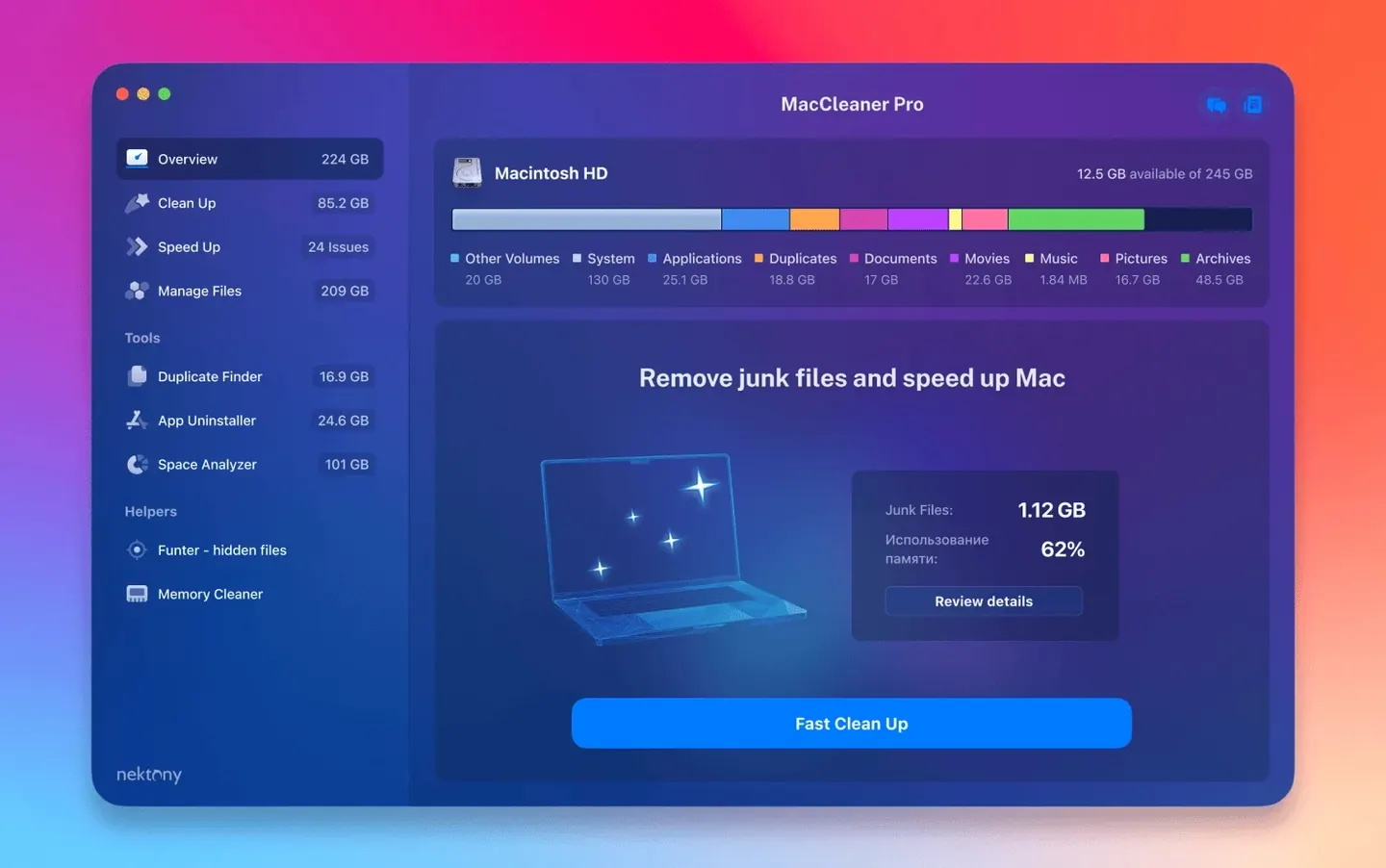
Version 4.0.2 landed in May with a handful of quiet fixes — better detection of what lives in your iCloud folder, smarter handling of custom Home folders, and a few interface rough spots smoothed over. If you have been holding off, those nagging little scanning hiccups should be gone now.
1. Check your Mac first
Before anything else, make sure MacCleaner Pro will actually launch. The bundle asks for macOS 10.13 High Sierra or newer, and it runs natively on both Apple Silicon and Intel 64-bit Macs. No Rosetta gymnastics required.
2. What lands on your drive
You are not getting one app — you are getting six. The installer delivers MacCleaner Pro itself plus App Cleaner & Uninstaller, Disk Space Analyzer, Duplicate File Finder, Funter, and Memory Cleaner. Each one tackles a different corner of a cluttered Mac: uninstalling stubborn apps, mapping disk usage, hunting duplicate files, surfacing hidden files with Funter, and freeing up RAM with Memory Cleaner. It is a full tool chest, not just a quick sweep.
3. The daily routine it aims for
Once everything is set up, the workflow is straightforward. Run Disk Space Analyzer to see what is eating your drive, let Duplicate File Finder clean up the copies, use App Cleaner & Uninstaller to properly remove leftovers, and keep Memory Cleaner in the menu bar for those moments when the system feels sluggish. The point is preventing that dreaded “Startup Disk Full” error before it appears.
If you are on an older Mac that still runs High Sierra or a fresh Apple Silicon machine and you want one bundle instead of six separate downloads, this is the setup worth a Saturday morning.
Where the bundle clicks with macOS
What makes a cleanup suite feel at home is how it plays with the parts of macOS you already use. MacCleaner Pro does not ask you to change habits — it slots into spots where the built-in tools stop short.
Take app removal. Dragging an app to the Trash leaves preference files, caches, and launch agents behind. App Cleaner & Uninstaller watches for that and offers to grab the leftovers when you drag an app out of Applications. It also hooks into System Settings by giving you a window on login items, launch agents, and browser extensions — all in one place, the way Apple's own panes should but do not. Disk Space Analyzer maps your drive as a sunburst chart, which is a faster read than the Finder's list view when you are chasing down a 40 GB mystery folder. And Memory Cleaner lives in the menu bar next to the clock, one click away, which feels more natural than opening Activity Monitor every time you notice a beachball.
Funter is the quiet connector. It patches a hole in Finder — the inability to toggle hidden files without a Terminal command. Drop it in the toolbar, and showing invisible .htaccess files or Library folders becomes a one-button affair during any Finder session.
Drag-and-drop uninstall shortcuts
A few conveniences sit just below the surface, and they are easy to miss on a first pass.
- Drag-and-drop uninstall — In App Cleaner & Uninstaller, you can drag any app icon from the Dock or Finder into the window. The tool scans for associated files immediately, no need to hunt through a list.
- Scan by folder in Duplicate File Finder — Instead of scanning your entire home folder, you can drop a single folder onto the window. This is handy when a client project folder has ballooned with revision copies.
- Memory Cleaner's threshold alerts — You can set a percentage in its preferences, and the menu bar icon changes color when free RAM dips below that line. No pop-ups, just a visual nudge.
- Funter's Finder integration — Enable the Finder extension once, and a toggle button sits in every Finder window toolbar. You stop thinking about it as a separate app.
- Scan profiles in Disk Space Analyzer — You can save scan results as snapshots. Compare a scan from last month to today's and see exactly which folders grew.
A weekend cleanup, step by step
Picture a Saturday morning. Your MacBook Air has been warning about low disk space for a week. You have thirty minutes and a cup of coffee. Here is a path through the suite that covers ground fast.
Open Disk Space Analyzer and let it scan the entire drive. The sunburst chart reveals a 22 GB bulge in ~/Library/Messages/Attachments — old photos and videos from group chats you forgot about. Make a mental note. Switch to Duplicate File Finder, drop your Documents folder onto it, and set the filter to files larger than 10 MB. It surfaces seven copies of a video project you archived three times. Delete the extras. Launch App Cleaner & Uninstaller and scan the leftovers tab. A handful of orphaned files from apps you removed months ago — including a 1.5 GB cache from a video editor you thought you had fully removed — appear in the list. Clear them. Finally, glance at Memory Cleaner in the menu bar. A click clears 2 GB of inactive RAM, and the system breathes. Total time: under half an hour. The startup disk warning does not return the next day.
Owners of 128 GB or 256 GB Macs
Not every Mac user needs a six-tool suite. But a few groups will feel the difference within the first week.
Mac users with 128 GB or 256 GB internal drives. When every gigabyte counts, the combination of duplicate scanning and deep app removal buys back space that a quick pass with macOS's built-in storage manager misses. The sunburst chart alone can reveal a single bloated folder that explains half the storage pressure.
People who test and remove software regularly. Designers trying out half a dozen mockup tools, developers cycling through IDEs, or podcasters evaluating audio editors will accumulate preference files, kernel extensions, and launch agents. App Cleaner & Uninstaller's leftovers scan catches what uninstallers leave behind.
Anyone managing large media folders. Photographers with scattered Lightroom catalogs, musicians with sample library duplicates, and video editors with proxy-file sprawl will use Duplicate File Finder more than the rest of the bundle combined. The ability to scan a single folder and match by checksum rather than filename is the detail that prevents accidental deletions.
Older Mac owners running macOS 10.13 through 10.14. These machines often have less RAM and smaller SSDs. Memory Cleaner's one-click purge and the lightweight nature of the individual tools — no Electron wrappers, no bulky frameworks — keep the suite usable on hardware that groans under newer all-in-one utilities.
If you have ever searched for a MacCleaner Pro license key or stumbled across a MacCleaner torrent while trying to solve a disk-space emergency, the bundle's straightforward setup removes that scramble. There is no activation dance, and since each tool does one job well, you are not wrestling with a single overwhelming interface. Some folks hunting for MacCleaner Pro crack downloads end up here because they need the full set — the duplicate finder plus the uninstaller plus the disk mapper — without stitching together free utilities that each miss half the leftovers. The same holds for MacCleaner 4 Pro searches and the occasional MacCleaner Pro torrent query: the appeal is getting the complete toolkit in one go, running natively on Intel and Apple Silicon, without the friction.
Version 4.0.4 has landed with the developer's latest round of fixes and performance improvements. Nothing flashy on the changelog this time, just the kind of steady upkeep that keeps the tools humming along.
- macOS 10.13 or later
- Works on Apple Silicon and Intel 64-bit Macs
Porch talk 0
Come in or pull up a chair to leave a comment.
Nobody has pulled up a chair yet. If you used it on a real Saturday, say what the hour was.
More for the same hour
Everything in Mac Cleaners
 MacBooster
8.3.0 Mac Cleaners
38 MB
MacBooster
8.3.0 Mac Cleaners
38 MB
 Magic Disk Cleaner
6.0.0 Mac Cleaners
Updated 7 MB
Magic Disk Cleaner
6.0.0 Mac Cleaners
Updated 7 MB

 Mole
1.14.0 Mac Cleaners
20 MB
Mole
1.14.0 Mac Cleaners
20 MB

 Ghost Buster Pro
7.0.0 Mac Cleaners
Updated 11 MB
Ghost Buster Pro
7.0.0 Mac Cleaners
Updated 11 MB

 CleanMyMac
5.7.0 Mac Cleaners
180 MB
CleanMyMac
5.7.0 Mac Cleaners
180 MB

 CCleaner Pro
1.18.30 Mac Cleaners
6 MB
CCleaner Pro
1.18.30 Mac Cleaners
6 MB

 AppZapper
2.0.3 Mac Cleaners
4 MB
AppZapper
2.0.3 Mac Cleaners
4 MB

 App Cleaner & Uninstaller
10.0 Mac Cleaners
47 MB
App Cleaner & Uninstaller
10.0 Mac Cleaners
47 MB