Photographers who spend Saturday mornings in Lightroom or Photoshop often reach for Imagenomic when a portrait needs smoothing that doesn't look plastic, or high-ISO shots carry too much chatter.
Portraiture — skin retouching that masks tones instead of blurring edges.
Noiseware — noise reduction that preserves detail by profiling the grain pattern first.
Realgrain — film-like texture added with control over grain size and shadow response.
The suite runs as a plugin inside your host editor, pulling up a preview panel where you tweak each effect with a few direct sliders. It feels less like applying a filter and more like dialing back what the sensor got wrong.
Many of the best things in the Imagenomic Plugin Suite are tucked into interface corners that most people scroll past. Once you know they're there, a retouch that used to take six passes becomes two.
Mask preview reveals exactly where smoothing lands
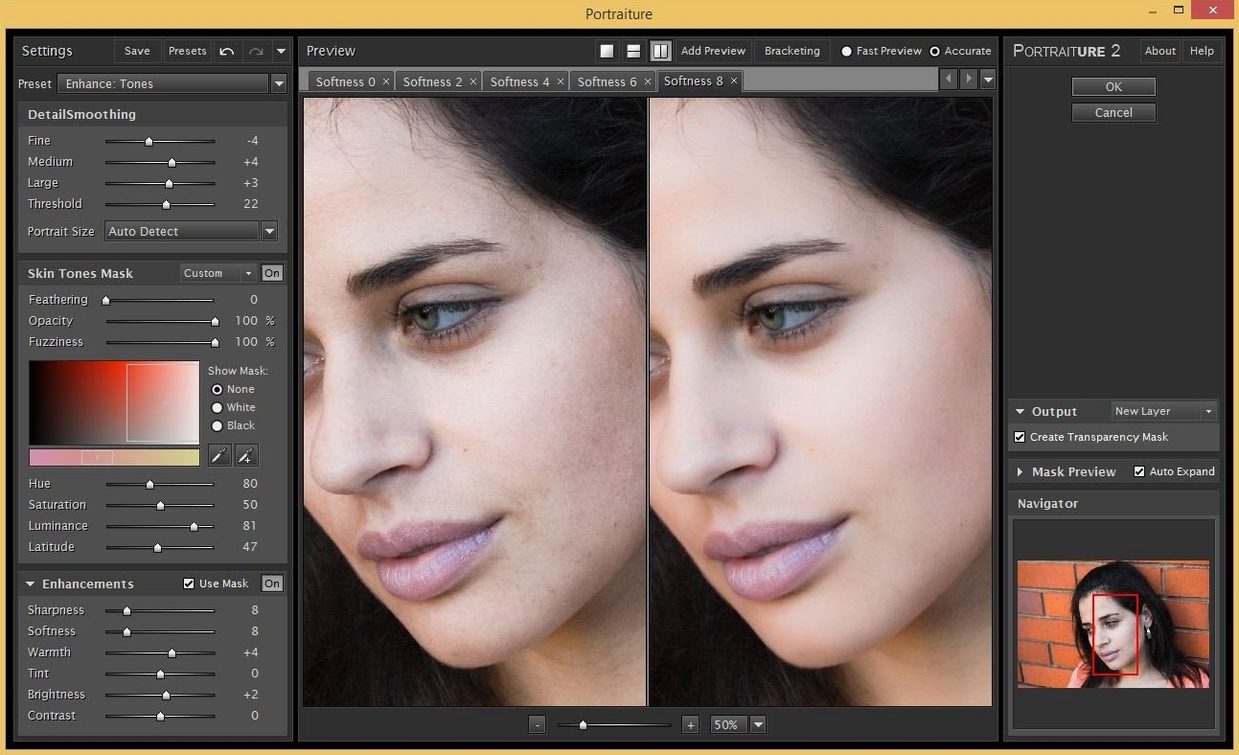
Portraiture's mask view is the one I'd point every new user toward first. Instead of guessing which areas the plugin is smoothing, tapping the mask preview shows skin regions as a soft overlay. It makes it obvious when the effect is reaching into hair or fabric, and the mask can be refined without switching tools.
Noiseware has a few quiet features hiding behind its sliders. The detail protection control matters more than the main strength slider for high-ISO portraits, especially in shadows where luminance noise tends to gather. And if you work on a batch of images from the same shoot, the profile you dial in for one frame can be saved and applied to the rest, which removes the most repetitive part of low-light editing.
Realgrain responds to changes you'd normally ignore. The grain size slider isn't just a texture dial — it shifts how the plugin distributes grain across highlights and shadows independently. Pulling shadow response down while keeping highlight texture moderate gives you a print-like rolloff that's hard to fake with a standard film emulation.
One-hour sandbox drill before real work
After installing the imagenomic professional plugin suite, give yourself an hour with each plugin before tackling a real job. That's the fastest way to build muscle memory for the slider ranges.
- Start with a test portrait that has mixed light. Run Portraiture at its default, then switch to mask view and walk the smoothness slider up and down while watching the edges of the face.
- Shoot or open a frame at ISO 3200 or higher. Apply Noiseware before any sharpening, since sharpening after noise reduction gives you a cleaner baseline to work from.
- Take the same photo into Realgrain and try three different film profiles. Note which grain size feels right for a 24-megapixel file before you start toning.
One habit that saves time: decide on your host editor early. The suite pairs equally well with Photoshop, Lightroom Classic, and Affinity, but keyboard behavior and layer handling differ slightly between them. Pick the one you know best and stay there for the first week.
Daily driver for high-volume portrait retouchers
Portrait photographers who deliver client work will use Portraiture almost daily. The plugin removes the tedium of frequency-separation passes while keeping enough texture that skin still reads as skin — a balance that matters when you're editing forty headshots before lunch.
Event and concert shooters tend to get the most out of Noiseware. Dark venues and high shutter speeds produce the kind of luminance noise that generic sliders turn into mush. Noise reduction that profiles the noise pattern first leaves edges alone, so a guitarist's hair or a speaker's jacket doesn't dissolve into plastic.
Black-and-white printers and film emulation fans are the natural audience for Realgrain. If you already spend time converting color files to toned monochrome, adding controlled grain as a final step gives the image a physical quality that pure digital edits often lack. The plugin's separate shadow and highlight response also suits people who think about paper grades and darkroom contrast.
Users looking for imagenomic for mac often fall into more than one of these groups, and the suite is structured for that overlap. The three plugins load from the same panel family and share the same preview logic, so moving from one to the next doesn't feel like switching apps.
Confirmed Apple Silicon and Intel Mac support
The most common question is whether the suite works on Apple Silicon. It does, and it also runs on Intel Macs, so older machines aren't left out. The current build supports macOS 13 and later, and both ARM and x86 64-bit systems are covered.
Another frequent question is about which editors the plugins support. Photoshop, Lightroom Classic, and Affinity are the three hosts Imagenomic lists for the Mac side, and that covers most working photographers. If you use a different editor, check whether it loads the same plugin formats before downloading.
People also ask whether the plugins can work as standalone apps. Noiseware is described as both a plugin and a standalone module, which is useful for quick noise passes outside a full editing session. Portraiture and Realgrain, by contrast, are built to run inside a host editor.
Some users search for an imagenomic torrent or an imagenomic video suite crack before trying the regular installer. The better move is to download the suite directly and follow the standard install steps: mount the disk image, run the Open Gatekeeper friendly script if prompted, press Enter in Terminal to bypass Gatekeeper, then drag the app to the Applications folder. Once it's in place, launching it from your editor is all that's left.
- macOS 13 or later
- Apple Silicon or Intel Mac
- Interface language: English
Questions I actually get
Does the Imagenomic Plugin Suite run natively on Apple Silicon Macs?
Yes, it supports both ARM and x86 64-bit systems, so it runs natively on Apple Silicon Macs without Rosetta translation.
Porch talk 0
Come in or pull up a chair to leave a comment.
Nobody has pulled up a chair yet. If you used it on a real Saturday, say what the hour was.