

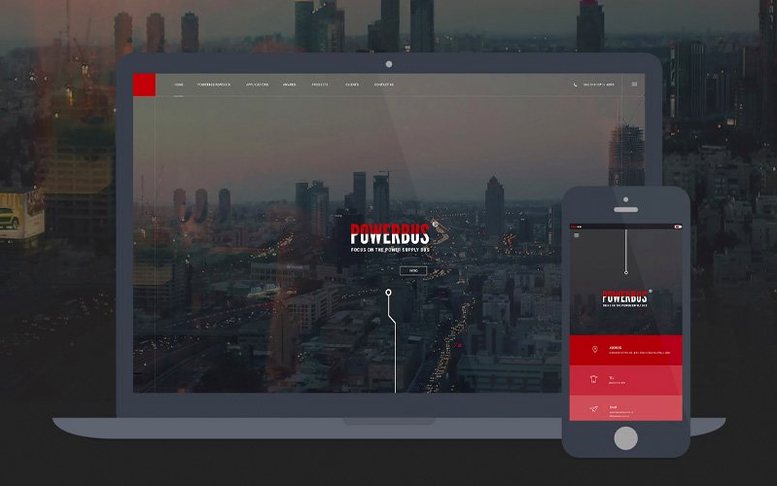



It's the tool a certain kind of web designer still gravitates toward — someone who splits their time between a visual canvas and a code editor, and doesn't want to bounce between three different apps to get a site live. Dreamweaver has held that middle ground for years, and the April 2026 update keeps it there.
Split-pane design with live Git controls
- Designers who prefer a split-pane view — live preview on one side, code on the other — without losing syntax highlighting or autocomplete.
- Workflows that lean on built-in Git support. Basic commit, push, and pull operations live right inside the interface, so you're not reaching for a separate terminal every time.
- Anyone revisiting older server-driven projects. Version 21.8 reintroduces built-in server behaviors and database bindings, which had been absent for a while.
- Apple Silicon Macs and older Intel machines. The app runs natively on both architectures under macOS Ventura and later.
Familiar layout, timestamp quirks on sync
- The interface and core editing model haven't seen a major rethink. If you left Dreamweaver years ago, the layout will feel familiar — for better or worse.
- Time-zone quirks linger. File modification times during site synchronization don't always refresh after a system time-zone change, which can trip up deployment workflows.
- It's a substantial install. You'll need 3 GB of free space just for the application files, plus extra room during setup.
Blank live view fix: refresh Chromium engine
Dreamweaver's split-pane magic sometimes gets in its own way. The live view can stall on a blank white screen while the code panel insists everything is fine. Nine times out of ten, the bundled Chromium engine just needs a kick — switching to Design view and back, or toggling Live View off and on with Option+F11, clears whatever rendering hiccup built up.
Site synchronization is the other head-scratcher. You push a batch of files, the timestamps look right, then twenty minutes later the remote server shows them out of order. That known time-zone issue in version 21.8.0 means Dreamweaver doesn't always re-read the system clock after macOS adjusts for daylight saving or a travel zone change. The quick fix: close the Site panel, open Terminal and run sudo sntp -sS time.apple.com, then relaunch Dreamweaver and let it rebuild the site cache. Annoying, but predictable once you know the rhythm.
Code hints sometimes vanish mid-session, especially after switching between PHP, HTML, and JavaScript files rapidly. The preferences file gets confused about which language context you're in. Instead of quitting the app, collapse the panel group that holds the code view, expand it again, and hit Control+Space — that usually jerks the hint engine back to life without losing your undo history.
Slower than Nova, richer built-in preview tools
Dreamweaver sits in a crowded lane these days. Nova from Panic runs circles around it for raw speed — launching in under a second, indexing projects instantly, and never fighting you with a busy cursor. But Nova is a code editor that added a preview pane. Dreamweaver is a visual builder that exposes the code. If your brain works better dragging elements onto a canvas and tweaking CSS properties in a panel, Nova's text-only roots will feel like a step backward.
RapidWeaver takes the opposite approach. It leans so hard into the visual metaphor that you can build an entire brochure site without touching a line of markup. The trade-off: you're locked into its theme engine and add-on ecosystem. Dreamweaver gives you raw HTML files you can open in any editor, upload with any FTP client, and hand off to any developer. That portability matters when you're not the only person touching the project.
VS Code with the right extensions — Live Server, HTML CSS Support, GitLens — gets surprisingly close to Dreamweaver's feature set for zero cost. But assembling that setup takes an afternoon of hunting through the marketplace and tweaking JSON settings files. Dreamweaver bundles the whole stack under one roof, with server behaviors and database bindings that VS Code can't replicate without a full local development environment. For someone who'd rather design than configure tooling, that out-of-the-box cohesion still counts.
Rookie slip-ups worth avoiding
The biggest trap beginners walk into is treating the Design view like a word processor. They click, drag, and type without ever glancing at the code panel, then wonder why the CSS turns into a bowl of spaghetti. Dreamweaver's visual tools generate inline styles when you resize or reposition elements manually. Three rounds of tweaking later, you've got style="position: absolute; left: 427px; top: 93px;" on a dozen divs and a layout that shatters on a different screen width. Learn to use the CSS Designer panel instead — it writes proper rules into the stylesheet, not inline garbage.
Another common fumble: ignoring site definitions entirely and opening loose HTML files from random folders. Without a defined site, Dreamweaver can't resolve relative links, manage file dependencies, or offer usable path hints. You'll spend an afternoon fixing broken image paths that would've been automatic if you'd taken two minutes to point the app at a root folder.
And then there's the Git panel. Beginners often stage and commit everything — template backups, Photoshop mockups, old client notes sitting in a subfolder — because nobody told them about the .gitignore file. Dreamweaver will happily commit your entire site folder, including the 300 MB of uncompressed raw photos you dumped in an assets directory. Set up exclusions before the first commit, or your repository will balloon into something nobody wants to clone.
Small-client freelancers needing functional dynamics
Freelancers juggling small-business clients tend to bond with Dreamweaver fastest. Their projects rarely demand a full JavaScript framework pipeline, but the sites do need contact forms that actually submit, database-driven product listings, and layouts that won't embarrass anyone on a phone. Dreamweaver's server behaviors handle the form-processing logic without writing PHP from scratch, and the responsive viewport presets let you sanity-check three screen sizes in as many clicks. When you're billing by the project, not the hour, that speed matters.
Educators teaching foundational web design also reach for it. Dreamweaver's split view lets a student see how a div nests inside a section while simultaneously watching the browser-like preview update. That instant feedback loop — type a rule, see the change — is harder to replicate in a pure code editor when someone's still learning the box model. The built-in tutorials accessible through the Adobe Help Center give a structured on-ramp that a blank VS Code window doesn't.
People coming back to web work after a few years away often download a dreamweaver mac torrent to see if the tool still fits their brain. The April 2026 update rewards that curiosity: the updated libraries under the hood mean modern JavaScript and Node.js play nicer than they did in earlier versions, and the interface hasn't drifted so far that old habits are useless. It's not a dreamweaver cc torrent chasing the latest hype cycle — it's the same split-pane workhorse, just a bit more sure-footed on today's macOS.
The April 2026 release is mostly about tightening things up under the hood and bringing back a couple of server-side features. Here's what landed in version 21.8.
- Built-in server behaviors and database bindings return to the app after a long absence.
- Updated core libraries: OpenSSL, Libcurl, CEP, jQuery, Lodash, RequireJS, Node.js, and Zlib all got a refresh.
- File modification time can drift out of sync with the local time zone during site synchronization, and it doesn't auto-correct when the system clock changes.
- macOS 13 Ventura or later
- Apple Silicon or 64-bit Intel processor
- 2 GB of RAM
- 3 GB of available hard-disk space for installation, plus additional free space required during setup
- Internet connection and Adobe registration for activation and online services
Questions I actually get
Does Dreamweaver 21.8 run on Apple Silicon?
Yes, it runs natively on both Apple Silicon and 64-bit Intel Macs starting with macOS 13 Ventura.
What Git features are included?
The app provides basic Git operations like commit, push, and pull directly from the interface, so you can manage version control without a separate client.
Porch talk 0
Come in or pull up a chair to leave a comment.
Nobody has pulled up a chair yet. If you used it on a real Saturday, say what the hour was.
More for the same hour
Everything in Mac Apps
 Adobe Dimension
4.1.7 Mac Apps
3.5 GB
Adobe Dimension
4.1.7 Mac Apps
3.5 GB
 Adobe Illustrator
30.8.2 Mac Apps
3.4 GB
Adobe Illustrator
30.8.2 Mac Apps
3.4 GB
 Adobe Bridge
16.0.8 Mac Apps
3.7 GB
Adobe Bridge
16.0.8 Mac Apps
3.7 GB
 Adobe InDesign
21.6.0 Mac Apps
1.5 GB
Adobe InDesign
21.6.0 Mac Apps
1.5 GB

 Adobe Lightroom Classic
15.6.0 Mac Apps
3.7 GB
Adobe Lightroom Classic
15.6.0 Mac Apps
3.7 GB

 Adobe Media Encoder
26.5.0 Mac Apps
3.4 GB
Adobe Media Encoder
26.5.0 Mac Apps
3.4 GB

 Adobe Animate
24.0.15 Mac Apps
6.5 GB
Adobe Animate
24.0.15 Mac Apps
6.5 GB

 Adobe After Effects
26.5.0 Mac Apps
8.8 GB
Adobe After Effects
26.5.0 Mac Apps
8.8 GB